
Trusted by 1.5 cr Business Owners
Barcode Inventory Software for Small Business
Simplify inventory management with Vyapar Barcode Inventory Management Software. Create barcodes, scan items instantly, update stock automatically. Available on Android, iOS, and Windows, both online and offline.
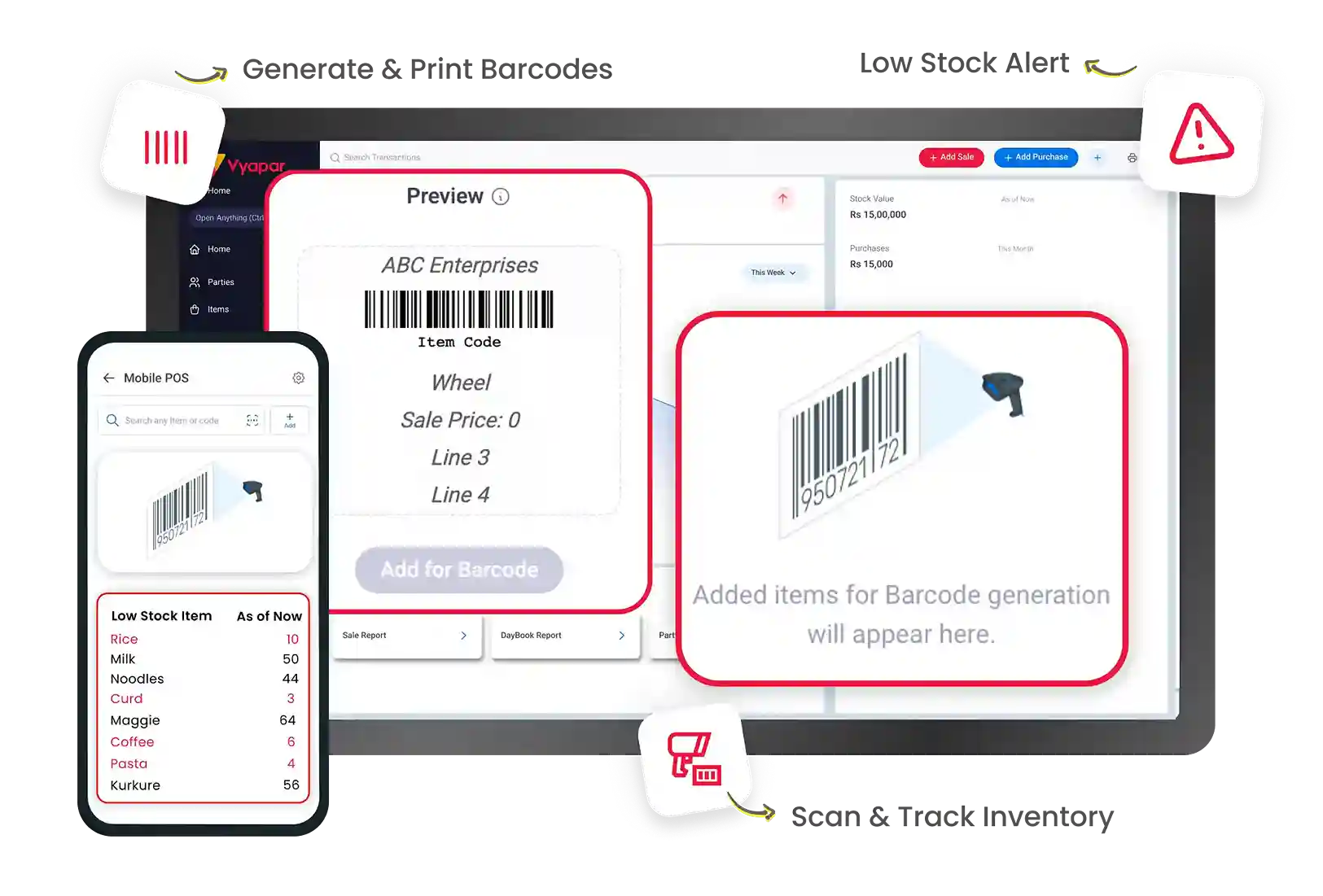
Generate & Print Barcodes
Low Stock Alerts
Scan & Track Inventory
Trusted by 1.5cr+ Businesses Across India
Join the leading businesses already using Vyapar Barcode Inventory Management Software
Key Features of Vyapar Barcode Inventory Management Software
Barcode-Based Inventory Tracking
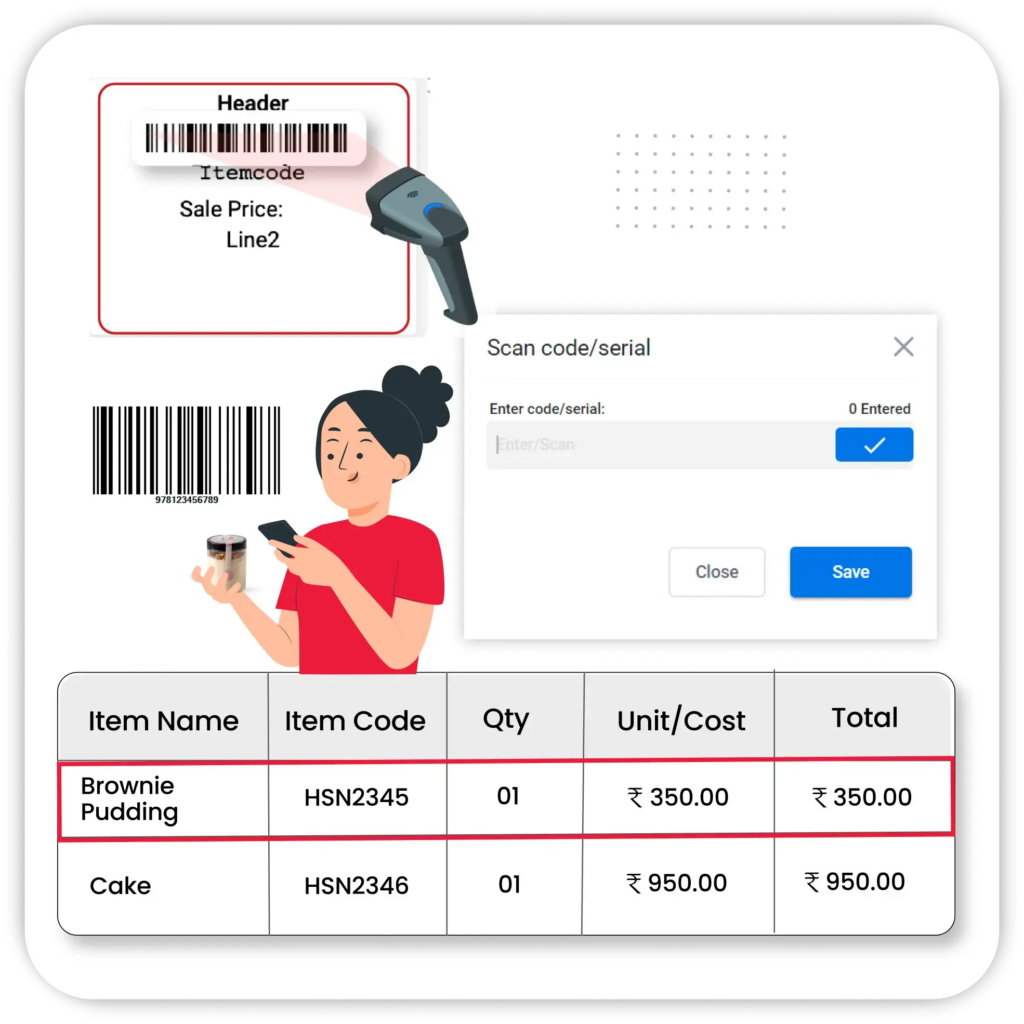
Vyapar links every product to a unique barcode. When a sale is made, scanning the product barcode deducts the quantity from stock instantly. When a purchase arrives, scanning the supplier barcode adds the received quantity with the correct batch and price. The result is a stock count that is always current without anyone updating a spreadsheet.
- Scan & Auto-Update Stock – Every sale or purchase auto-adjusts stock levels when a barcode is scanned.
- Error-Free Entries – Minimise manual mistakes with automatic item detection through barcode scanning.
- Real-Time Inventory View – Instantly check item availability and quantities across locations with barcode-linked stock records.
Fast & Accurate Billing via Barcode Scanning
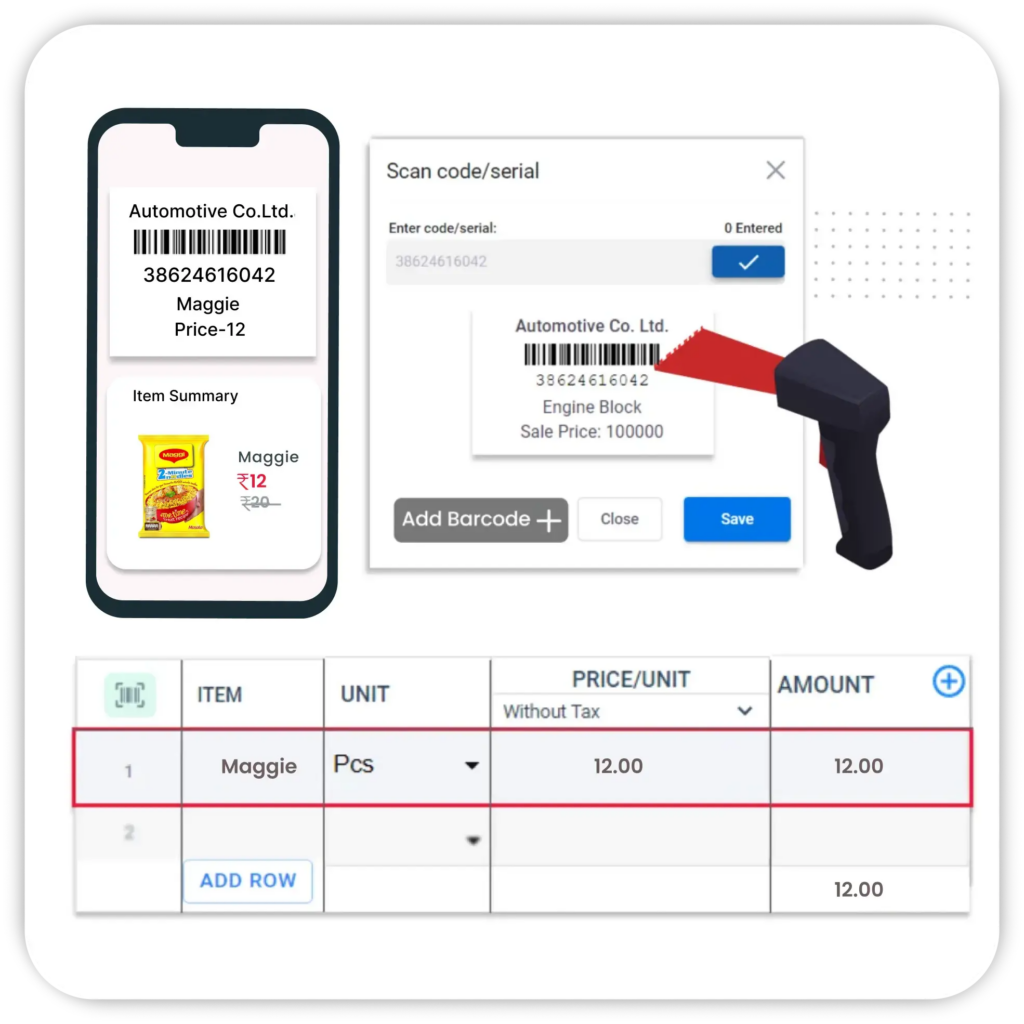
At the billing counter, scanning a product barcode pulls its price, GST rate, HSN code, and applicable discount into the invoice in under a second. For a retail store processing 100-plus bills a day, eliminating the manual item lookup for each product saves 30 to 40 minutes of billing time daily and removes the pricing errors that cause customer disputes.
- Instant Item Entry — Add products to invoices in one scan, complete with tax, price, and unit information.
- Supports Mobile & External Scanners – Use your phone camera or barcode scanner for seamless operations.
- Auto-Fill Item Details – Pull up product data like price, GST, and discount instantly—no manual input required.
Barcode Label Generation & Printing
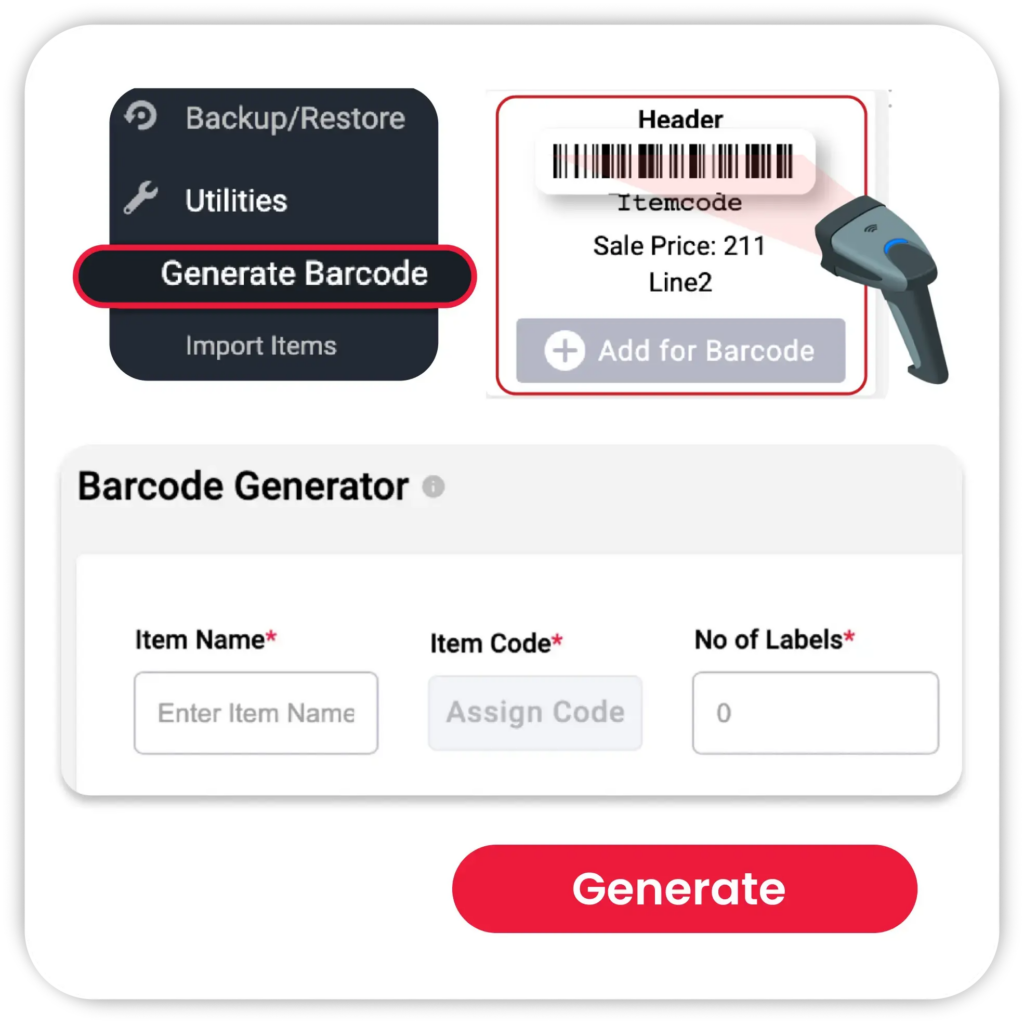
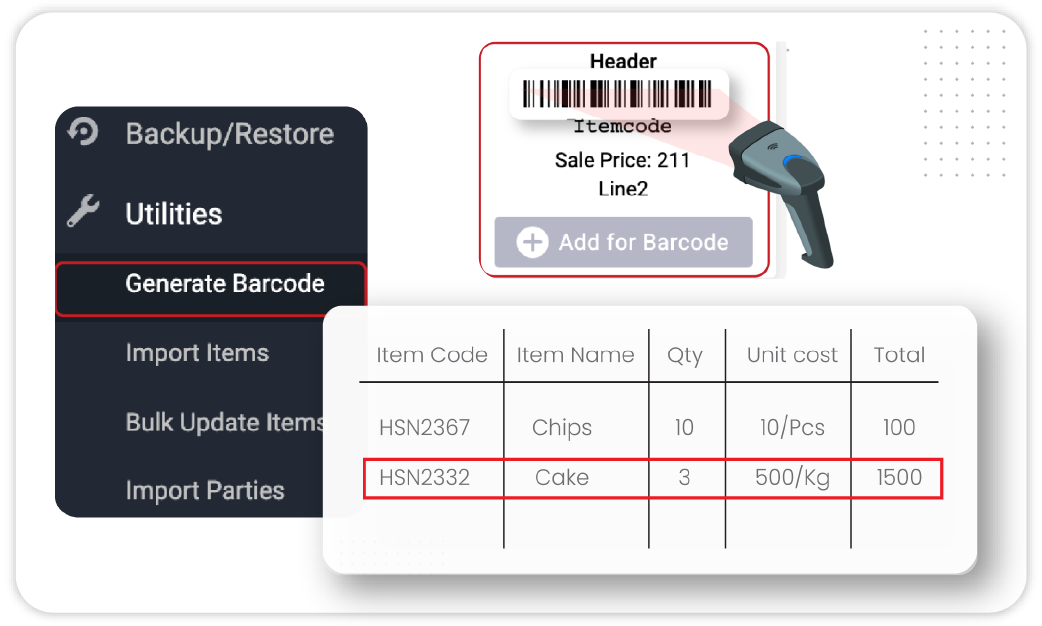
Vyapar generates barcodes using the item name, SKU, or HSN code and prints them as sticker labels from any standard or thermal printer. For a retailer receiving unmarked stock from a supplier, this means assigning a barcode to each new product at the point of goods receipt and printing the shelf label in one step, without a separate labelling tool.
- Custom Barcode Creation – Generate barcodes using item name, SKU, or HSN code.
- Label Printing Support – Print barcode stickers for packaging using supported printers.
- Retail-Ready Format – Include price and item name on printed labels for shelf or warehouse tagging.
- Generate Barcodes from Purchase Bills – Create barcodes for new products while recording purchase bills. Save time and start tracking inventory immediately.
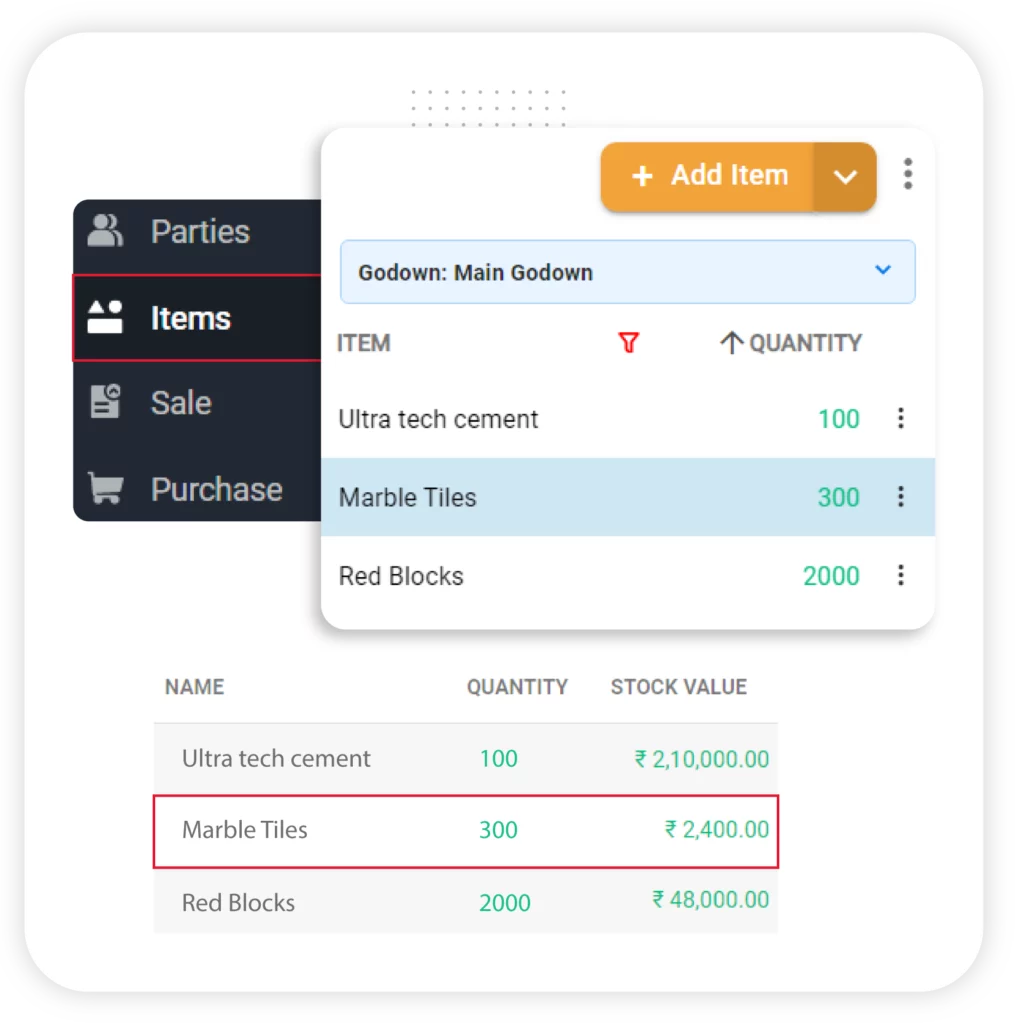
Inventory Management Using Barcodes
Ensure precise inventory movement tracking with barcode-enabled inward and outward stock recording. Vyapar offers an inventory management system with a barcode scanner that improves stock accuracy and visibility.
- Barcode-Based Purchase Entries – Scan and record new stock instantly during purchase entry.
- Barcode in Sales Invoices – Track outgoing items through barcode scans at the time of sale.
- Auto-Adjust Inventory – Stock levels update automatically based on real-time barcode scans.
- Real-Time Barcode Inventory Tracking – Track every stock movement with a barcode scan. Vyapar records all inward, outward, and inter-warehouse transfers, giving you complete visibility into inventory across locations.
Everything You Need for Barcode-Based Inventory Management

Seamless barcode scanning

Real-time stock updates

Detailed inventory reports
Customisable inventory settings


Accounting integration

User-Friendly Interface




Why Indian Businesses Choose Vyapar for Barcode Inventory Management
Vyapar’s barcode inventory management software is trusted by 1.5 Cr+ businesses across India. From retailers and wholesalers to distributors and manufacturers, businesses use Vyapar to simplify billing, track inventory, manage stock across locations, and keep accounts updated automatically.
Seamless barcode scanning
Vyapar GST billing software supports scanning through a phone camera, a Bluetooth handheld scanner, and a USB barcode scanner connected to a desktop. A scan at the billing counter takes under a second to identify the item, pull the price and GST rate, and add it to the invoice. The same scan at the stock entry screen adds the quantity to inventory. One hardware setup covers both billing and stock management.
Real-Time Stock Updates
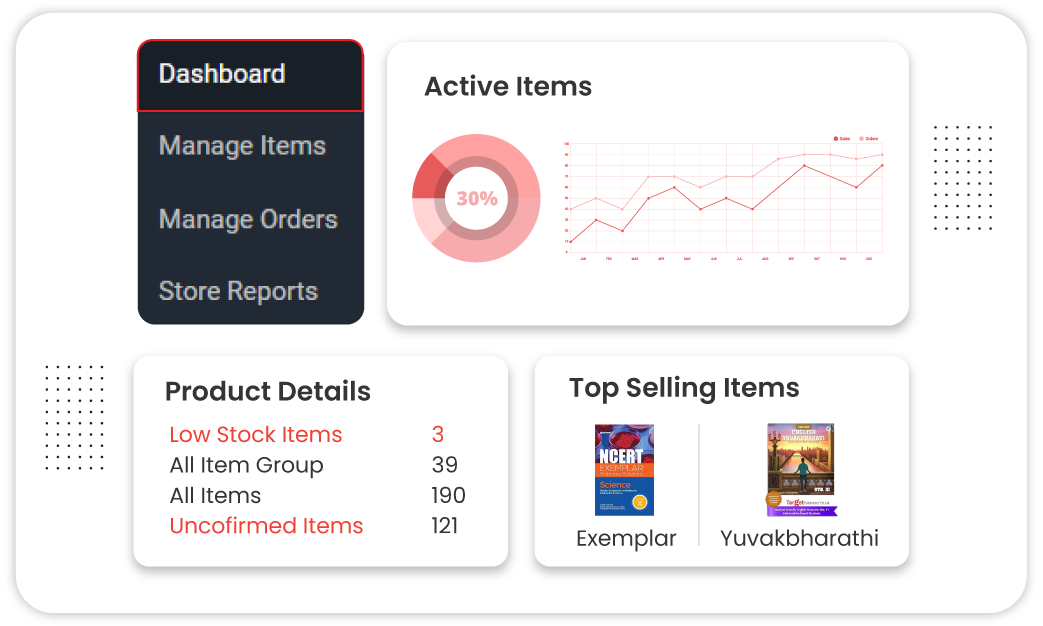
Vyapar updates the stock count of each barcoded item the moment a sale or purchase is recorded. When any item falls below its minimum stock threshold, Vyapar sends a low-stock alert. For items with a batch or expiry date, an alert fires when the expiry is approaching. Both alerts can be configured per item, so a fast-moving product triggers earlier than a slow-moving one.
Batch Wise Inventory Tracking
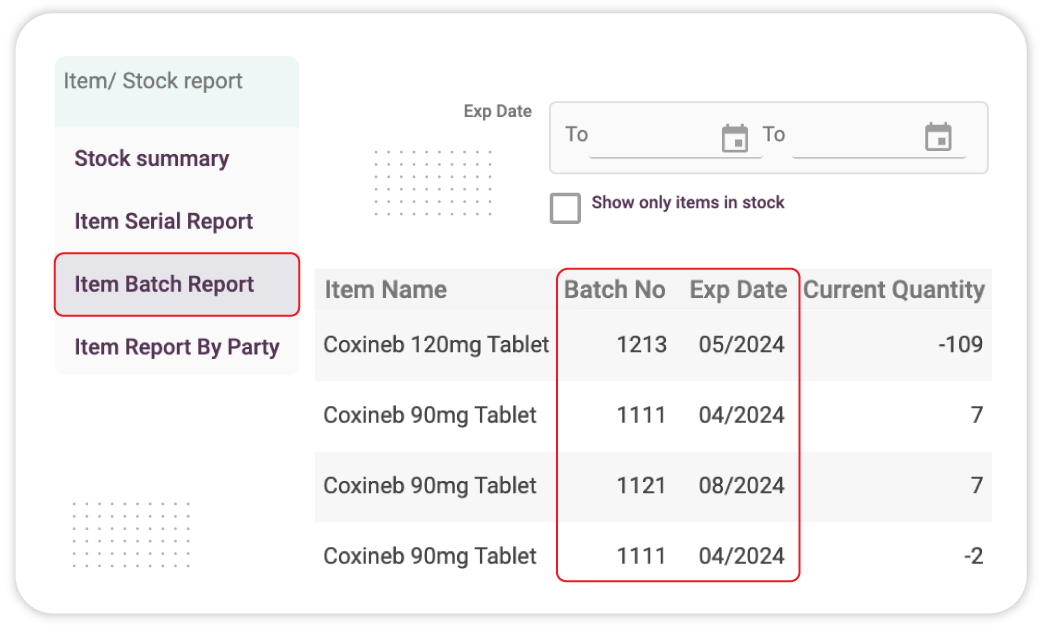
Track products by batch number and expiry date with ease. When a purchase is received, scanning the supplier barcode in Vyapar lets you assign a batch number and expiry date to that specific delivery. FEFO (First Expiry First Out) logic then ensures the oldest batch is always sold before a newer one, reducing write-offs from expired stock. For a medical distributor or a food business, this batch-level traceability also satisfies Drug Inspector and FSSAI audit requirements.
Detailed Inventory Reports
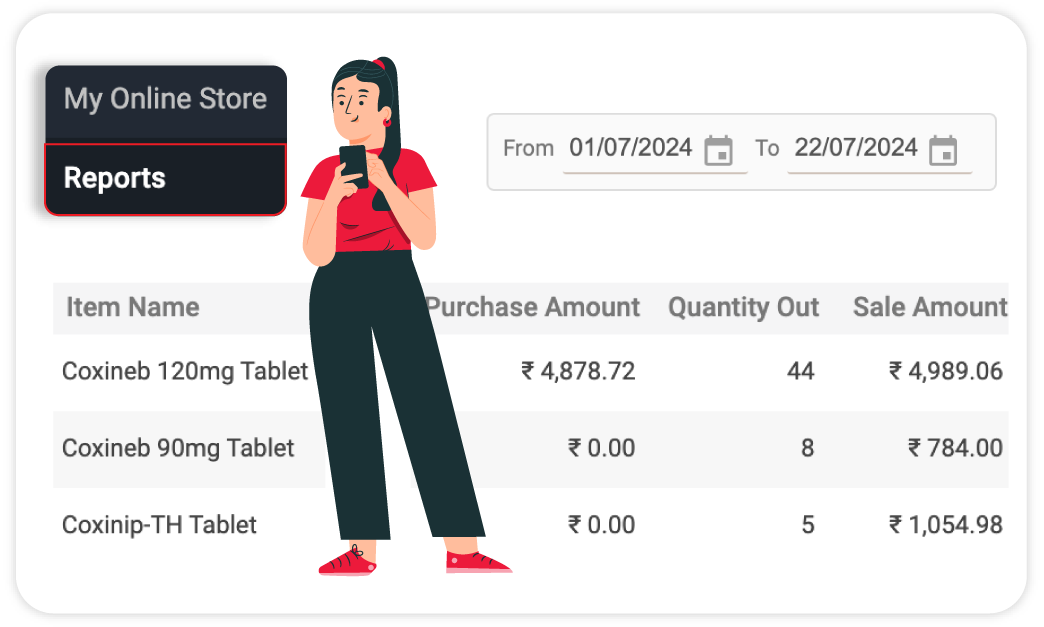
Vyapar generates barcode-linked reports that cover: item-wise stock levels so you know what is in hand, batch-wise movement so you can trace which batch was sold to which customer, fast and slow-moving stock analysis so you can identify which barcoded items to reorder and which to discount, and inventory valuation so your accountant knows the current worth of stock on hand.
Customisable Inventory Settings
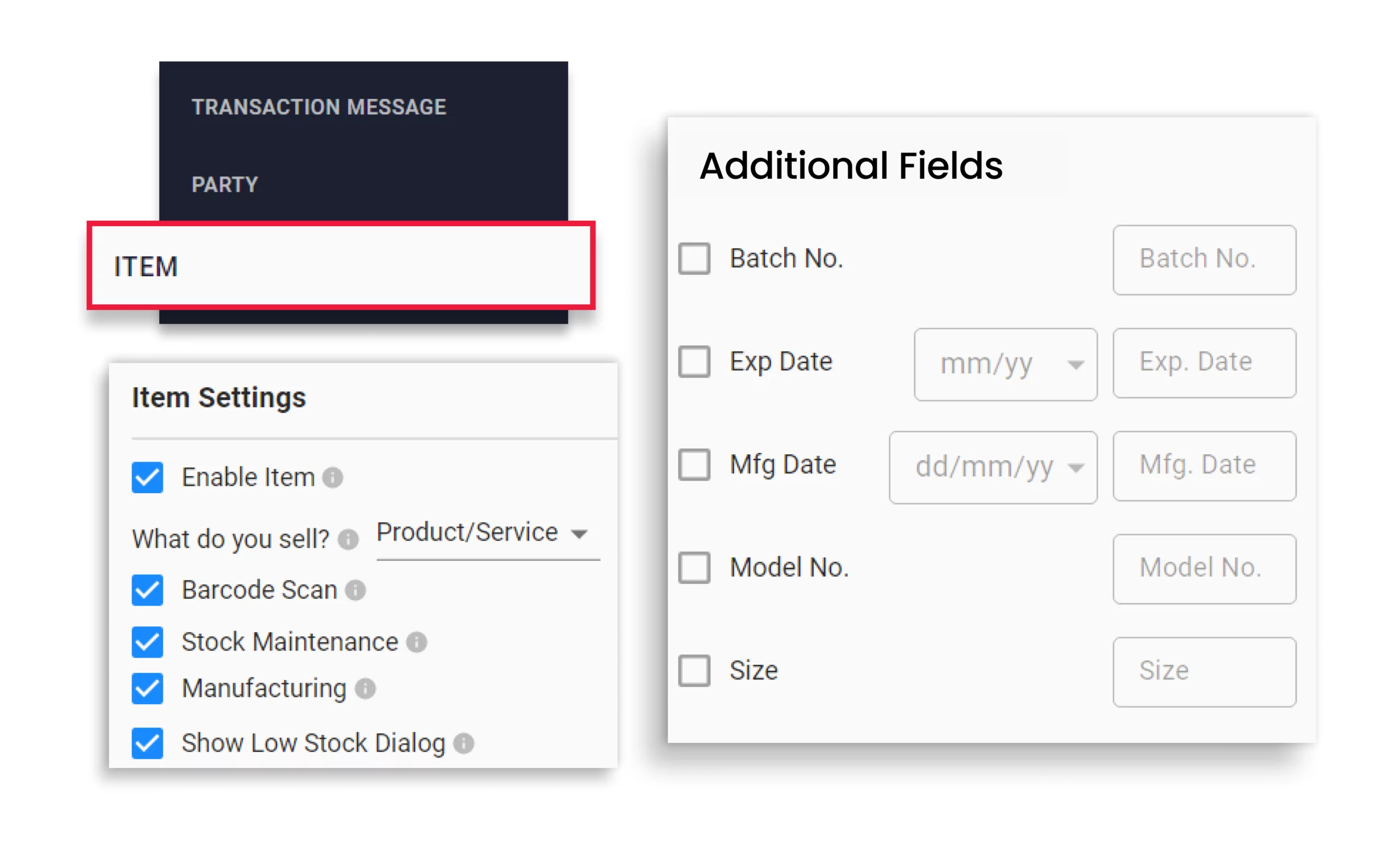
Barcode inventory tracking software allows customised barcode inventory tracking, which is required as per your business needs. You can set a minimum stock level, categorise products, and add additional fields to suit your specific operational requirements. It gives better control over your inventory and increases efficiency.
Multi-Location Stock Management
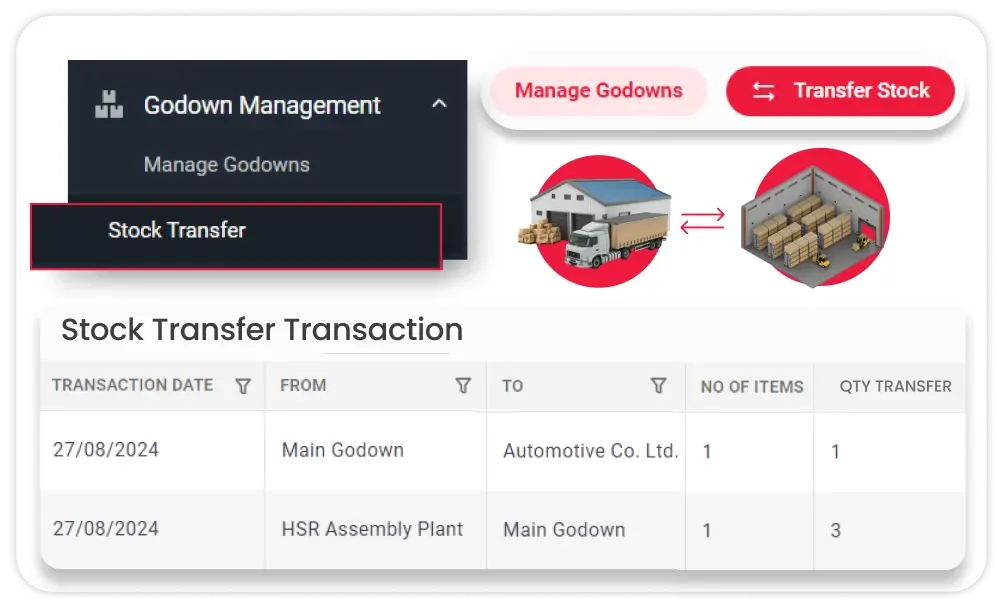
Scanning a barcode in Vyapar identifies not just the item but also its current location. When stock is moved from one warehouse to another, both locations are updated from a single scan-based transfer entry. A business owner with five retail outlets can see the barcode-linked stock count at each outlet from the same dashboard without visiting any of them.
Accounting Integration
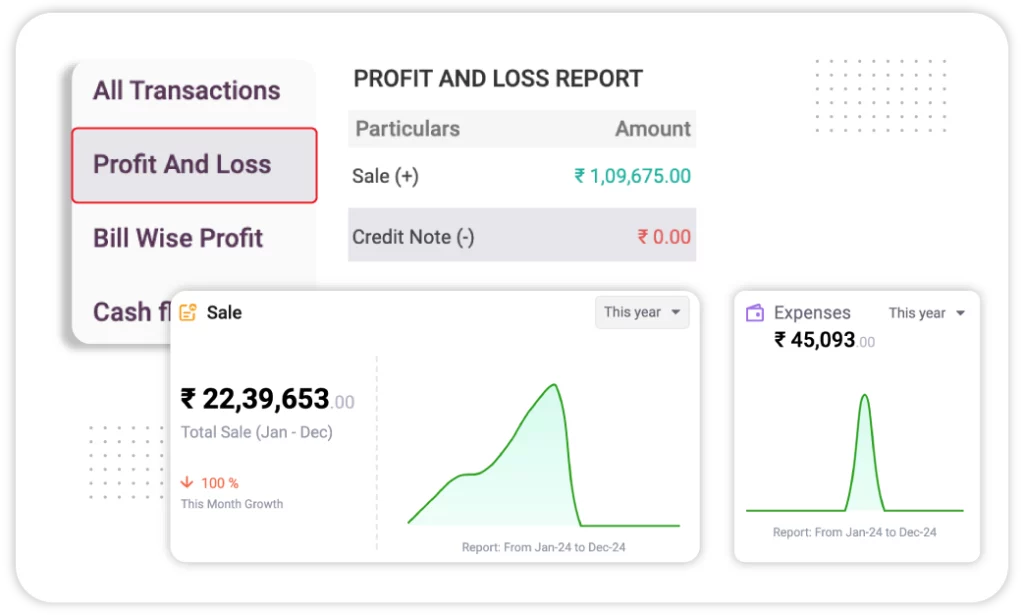
Every barcode scan is linked to the accounting system, keeping your inventory and accounts updated together. A sale scan generates the revenue entry and reduces stock value in the balance sheet simultaneously. A purchase scan creates the payable entry and adds stock value. This means the profit and loss account, stock valuation, and supplier ledger are always in sync with physical inventory without any separate bookkeeping.
User Management
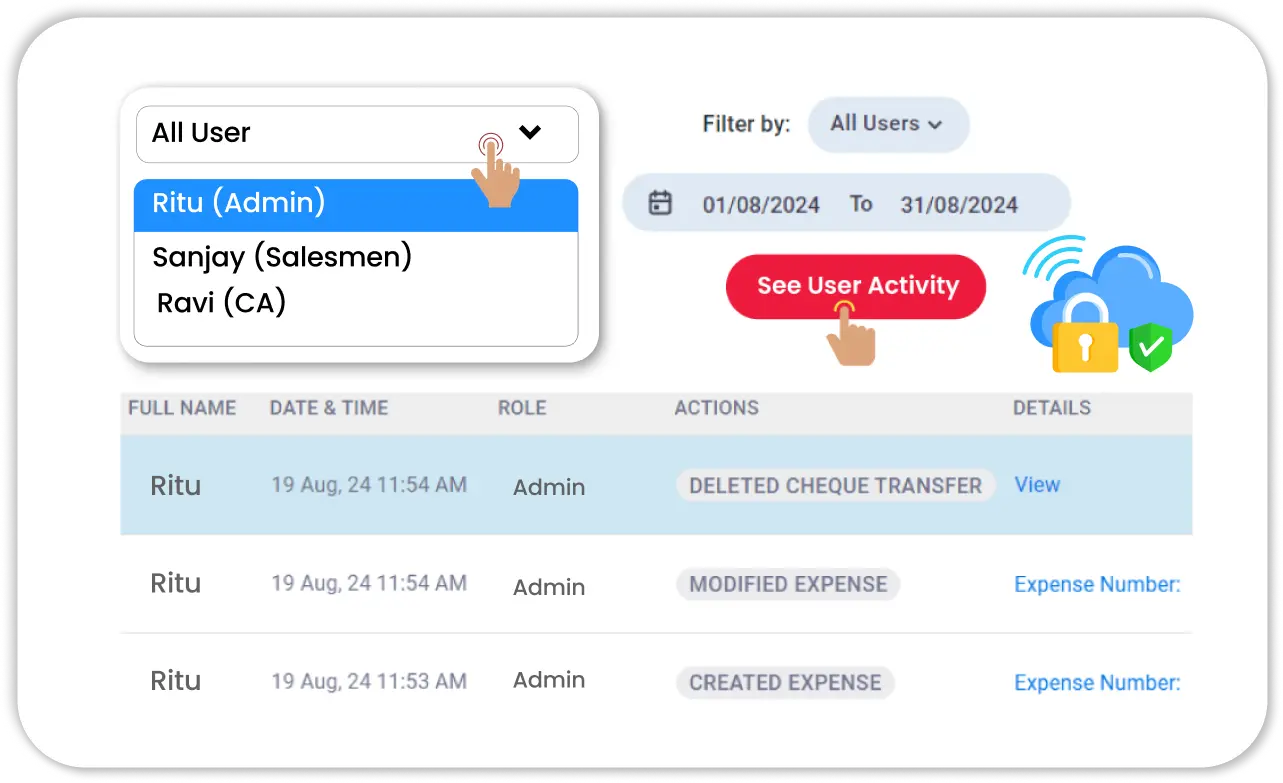
With an inventory management system with a barcode scanner, every item movement can be tracked once recorded. If you give access to multiple users, you can track all the transactions recorded by each user. This makes the software transparent and secure. Inventory management with barcode scanning minimises the risk of fraud and ensures transparency. You can easily and quickly identify and rectify any kind of discrepancies. It overall provides an enhancement in operational efficiency and leads to better decision-making and customer satisfaction.
Key Reasons to Choose Vyapar for Barcode Inventory Management

Improve Billing and Inventory Accuracy
Manual item entry during billing can lead to mistakes. Entering the wrong product code or price can affect both your invoice and stock records. With Vyapar’s Barcode Inventory Management Software, simply scan a product to automatically add the correct item details, price, and GST rate. This helps create accurate bills and keeps your inventory up to date.
With barcode-based inventory tracking, you can:
- Track every sale, purchase, and stock transfer automatically.
- Check the history of each stock movement whenever needed.
- Find and fix inventory mismatches faster without manually checking all items.
This makes barcode inventory management software useful not only for billing but also for maintaining accurate stock records every day.
Efficient Inventory Monitoring
A stock audit becomes much faster with barcode inventory management software. Simply scan the items on your shelves, and the system automatically compares the physical stock with your recorded inventory. If there is any mismatch due to missed entries, damaged items, or stock loss, it is highlighted instantly.
Benefits of barcode-based stock audits:
- Compare physical stock and recorded inventory in minutes.
- Identify missing, damaged, or mismatched items quickly.
- Reduce the time spent on manual stock counting.
With Vyapar’s barcode inventory system, you can also track stock movement, monitor sales trends, and view detailed inventory reports to make better business decisions.

Provide Multiple Payment Options
Once an invoice is created, customers can pay using UPI, QR code, NEFT, IMPS, or cash. The selected payment method is automatically recorded with the invoice, making cash and bank reconciliation easier at the end of the day.
With a barcode inventory management system, you can:
- Offer multiple payment options to customers.
- Record payments automatically against each invoice.
- Track cash, bank, and digital payments from one place.
Giving customers the flexibility to pay the way they prefer improves their buying experience and helps your business serve more customers efficiently.
Professional Outlook
With Vyapar’s barcode inventory system, item details such as product name, quantity, price, and GST are added to the invoice automatically when scanned. The bill can be printed or shared instantly through WhatsApp, helping you serve customers faster.
Benefits of barcode billing:
- Create professional invoices in seconds.
- Add item details automatically with barcode scanning.
- Print or share bills with customers instantly
- Reduce billing time and improve accuracy.
Using inventory management software with barcode scanning helps speed up the billing process, reduce customer waiting time, and make daily operations more efficient.


Greater Business Control
With inventory software that supports barcode scanning, you can manage products accurately at every stage of your business. Barcode scanning reduces manual entry errors and keeps your inventory records up to date.
Using barcode inventory management software, you can:
- Track individual products with a quick barcode scan.
- Know exactly what stock is available at any time.
- Identify low-stock items before they run out.
- Avoid missed sales caused by stock shortages.
Simply scan a product barcode to update inventory instantly and maintain better control over your stock levels.
Plan Your Inventory Tracking
With Vyapar’s barcode inventory software, you can set minimum stock levels for each product and receive alerts when inventory runs low. This helps you reorder items on time without manually checking every shelf. You can also create purchase orders and send them to suppliers directly from the same system.
With barcode-based inventory tracking, you can:
- Monitor available stock across all products.
- Get low-stock alerts before items run out.
- Identify inventory mismatches through regular stock checks.
- Detect missing stock by comparing sales and inventory records.
Using barcode inventory software helps you maintain accurate stock records, reduce losses, and stay prepared for customer demand.


Automated Payment Reminders
Managing payments is easier with barcode inventory software that includes payment tracking and reminder features. You can monitor outstanding invoices, due amounts, and payment status from a single dashboard.
With the automated payment reminder feature, you can:
- Track pending and overdue payments easily.
- Send automated payment reminders through WhatsApp and email.
- Notify customers about due dates and outstanding balances.
Timely reminders help customers make payments on time, improving your cash flow and reducing follow-up efforts. You can also accept payments through multiple payment modes, making it more convenient for customers to pay and helping your business get paid faster.
How to Choose the Right Barcode Inventory Management Software
Choosing the riChoosing the right inventory management software with a barcode scanner can help you manage inventory more accurately, reduce manual work, and improve day-to-day operations. Here are a few important features to look for before selecting a solution.
Look for User-Friendly Features
Vyapar barcode inventory management software is simple to use, making it easy for your team to manage stock without extensive training. Generate and scan barcodes, track inventory in real time, receive low-stock alerts, and update stock automatically with every sale or purchase through an easy-to-use interface.
Generate Barcodes Quickly
Choose a software that allows you to create barcodes for products in bulk and manage them from one place. This saves time when adding new inventory and makes it easier to maintain accurate product records as your business grows.
Print Barcodes at Any Time
Your software should support barcode label printing whenever needed. Whether you use a thermal printer or a standard office printer, you should be able to create and print barcode labels for products, shelves, and packaging with ease.
Turn Your Android Phone Into a Barcode Scanner
A reliable inventory software with barcode scanner support should work with both smartphones and external barcode scanners. This gives your team the flexibility to scan products, update inventory, and perform stock checks from anywhere.
Automated Inventory Management
The best stock management software with barcode support automatically updates inventory whenever products are sold, purchased, or transferred. This reduces manual data entry, improves inventory accuracy, and helps you track stock levels in real time.
Key Benefits of Using Vyapar’s Barcode Inventory Software
Save Time on Daily Inventory Tasks
Managing inventory manually takes time and often leads to mistakes. With Vyapar’s barcode inventory management software, you can scan products to update stock, create invoices, and record inventory movements instantly. This reduces manual work and helps your team complete tasks faster.
Reduce Inventory Costs
Knowing exactly what is in stock helps you avoid overstocking and unnecessary purchases. A barcode inventory management system provides accurate inventory records, allowing you to maintain optimal stock levels and improve cash flow.
Improve Inventory Accuracy
Manual stock entry can lead to pricing errors, incorrect stock counts, and missing inventory records. Using inventory management software with barcode scanning helps keep inventory data accurate by automatically recording stock movements with every scan.
Real-Time Inventory Visibility
Get real-time visibility into your inventory with automatic stock updates after every sale, purchase, or stock adjustment. Vyapar barcode inventory software helps you monitor current stock levels, avoid inventory mismatches, and make faster restocking decisions with accurate, up-to-date inventory records.
Better Security and Stock Control
Improve inventory security and maintain better stock control with barcode-based tracking in Vyapar. Every sale, purchase, and stock movement is recorded automatically, helping you reduce stock loss, prevent unauthorised inventory changes, and maintain accurate inventory records at all times.
Track Inventory with Ease
With inventory tracking software that supports a barcode scanner, you can monitor stock levels, locate products quickly, and track inventory across different locations. This improves inventory visibility and helps ensure products are available when customers need them.
Free & Affordable Plans for Your Business
Start now, save more, and scale faster with Vyapar’s Barcode Inventory software packages!
Desktop
Mobile
Desktop
Free Trial
Try 7 Days Trial
All Features are Unlocked
Perfect for getting started
 Audit Trial
GSTR Reports
Expense Tracking
1 Firm/Organisation
Invoice & Bill Creation
Silver Plan
₹283/month
Buy for 3 Years – Save ₹0 Today!
Great for Small Businesses
3 Firm/Businesses
Item Reports
Multi Device Sync
Fixed Assets
WhatsApp Integration
Import Parties
Share with CA

Most Popular
Gold Plan
₹308/month
Buy for 3 Years – Save ₹0 Today!
Most popular for Growing Businesses
Everything in Silver plan
5 Firm/Businesses
Service Reminders
Journal Entries
Chart of Accounts
Billwise Profit/Loss Reports
Add TCS/TDS on Invoices
Account Statement
Accountant Access
Retail Pro Plan
₹833/month
Buy for 3 Years – Save ₹0 Today!
Popular for Large Businesses
Everything in Gold plan
Unlimited Firms
Unlimited Firm Backups
Stock Transfer Reports
GSTR Reports
Vyapar POS & Payments
Partywise Profit/Loss Report
Audit Trial
Mobile
Free
Lifetime Free
Limited Access
Perfect for getting started
Audit Trial
GSTR Reports
Expense Tracking
1 Firm/Organisation
Invoice & Bill Creation
Silver Plan
₹0/month
Buy for 3 Years – Save ₹0 Today!
Great for Small Businesses
Everything in Free plan
3 Firm/Businesses
Multi Device Sync
Fixed Assets
WhatsApp Integration
Import Parties
Share with CA
Most Popular
Gold Plan
₹0/month
Buy for 3 Years – Save ₹0 Today!
Most popular for Growing Businesses
Everything in Silver plan
5 Firm/Businesses
Service Reminders
Journal Entries
Chart of Accounts
Billwise Profit/Loss Reports
Add TCS/TDS on Invoices
Account Statement
Accountant Access
Retail Pro Plan
₹0/month
Buy for 3 Years – Save ₹0 Today!
Popular for Large Businesses
Everything in Gold plan
Unlimited Firms
Unlimited Firm Backups
Stock Transfer Reports
GSTR Reports
Vyapar POS & Payments
Partywise Profit/Loss Report
Audit Trial
How Different Businesses Benefit from Vyapar Barcode Inventory Software

Pantry Business

If you run a business that requires managing pantry stocks, Vyapar barcode-based inventory management software acts as an excellent pantry inventory app with barcode scanner functionality. With Vyapar, you can easily scan barcodes to keep track of food items, monitor expiration dates, and ensure that your pantry stays well-stocked without over-ordering or running out of essentials. This makes it perfect inventory and billing software for grocery stores, food service businesses, or even office pantry management.

Home-Based Businesses
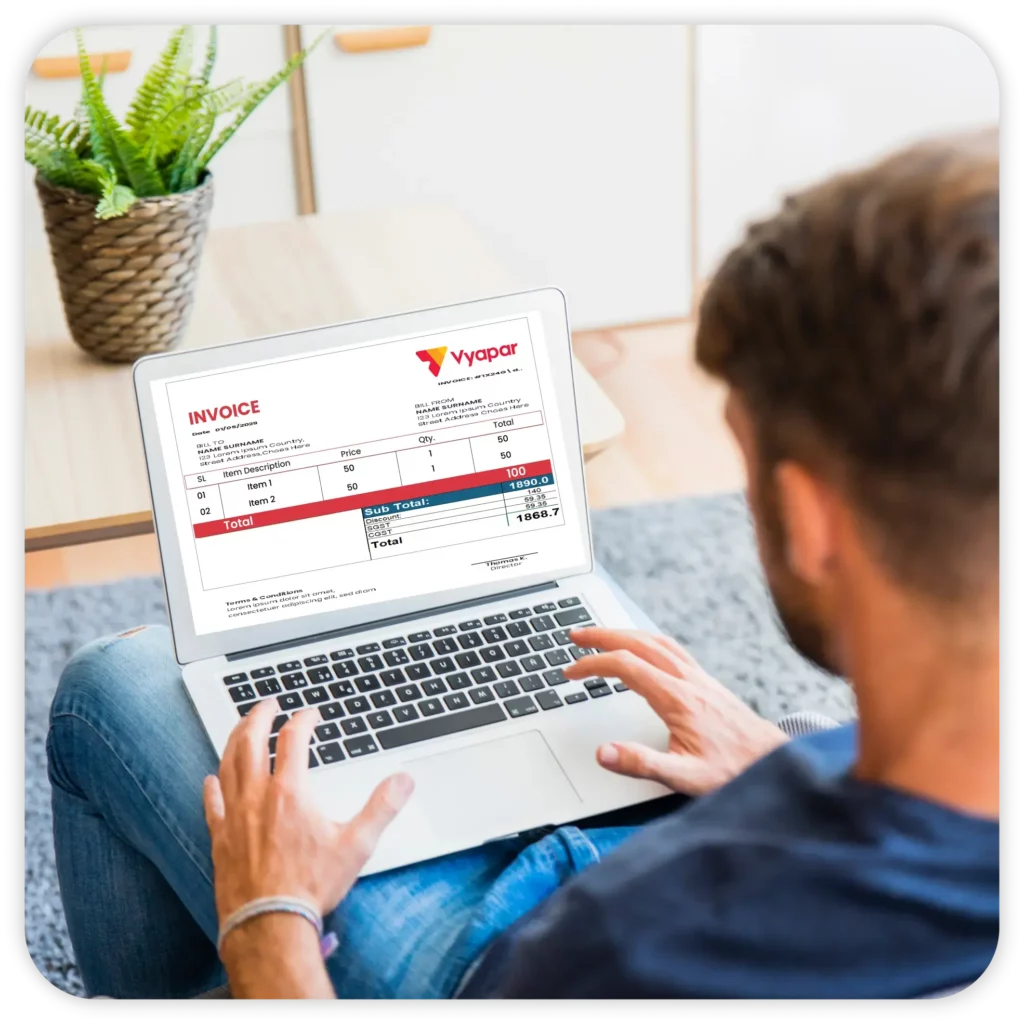
For those managing inventories at home, Vyapar also works as a home inventory software with a barcode scanner. Whether you run a small home business or simply need a solution for organising personal items like appliances, furniture, or even crafting materials, Vyapar appliance inventory management software helps you maintain accurate records of your stock. You can easily categorise, scan, and update item details, helping you stay organised while saving time and effort.

Logistics

Transport Business
A transport business handles multiple consignments that need to be delivered to the correct locations. Tracking each consignment is crucial to avoid loss during transit. With Vyapar’s barcode inventory software, you can use delivery challan formats and generate a delivery challan for each consignment and monitor its location in real-time. Once the consignment is delivered, the challan can be seamlessly converted into an invoice, ensuring efficient and accurate tracking for your business.

Retail

Managing inventory and sales in a grocery store becomes effortless with Vyapar’s Retail inventory software. You can easily track sales and purchase orders using barcode scanning and simplify your accounting process. Vyapar helps you create detailed invoices with all transaction data, making it easier to generate GST reports and file taxes accurately.

Electric and Electronics

Vyapar’s barcode inventory software helps you manage account receivables and payable effortlessly. By tracking cash flow and inventory using barcodes, you can efficiently place orders with suppliers for ongoing projects. The Electronic inventory software also ensures you keep track of all equipment and tools in stock, preventing unnecessary purchases of items already available in your shop.

Healthcare

Vyapar’s barcode inventory software is designed to meet the specific needs of healthcare organisations. It ensures accurate financial tracking, seamless billing, and compliance management. With pharmacy inventory software, you can easily track medical supplies and set up automated alerts for expiring medicines or low stock levels, ensuring you never run out of essential items.

Automotive

Automobile Shop
Vyapar’s barcode inventory software is ideal for automotive shops, ensuring accurate sales tracking and efficient inventory management. By using barcodes, you can easily monitor spare parts inventory management, tools, and vehicles in your store. The software also simplifies the process of generating GST reports, saving you time during tax filing and streamlining your operations.
Hear What Business Owners Say About Vyapar Barcode Inventory Software
Real experiences from businesses using Vyapar every day.
“One app for billing, stock update and GST compliance
Vyapar gives me peace of mind, my invoices and GST returns are accurate, and app keeps everything clean and simple for my shop.”
– Source: Capterra
“Easy Inventory software for Indian Businessmen.
The app essentially facilitates easy use of mobile phone for the purpose of billing and inventory management.”
– Source: Capterra
“Best Billing, Accounting & Inventory Management Software. Best billing app I have ever seen in the play store. I liked their invoice formats. I was shocked that there are 14 invoice formats. No one will provide these many formats for free. Faster billing and accounting and UI are also too good.”
– Source: Capterra
“My personal view
Being a businessman, with a busy schedule and I often don’t get time to maintain balance and inventory for my company. Vyaparapp Helps in easy handling my company transactions and details”
– Source: Capterra
“Vyapar’s inventory tracking has completely transformed our stock management. We used to spend 4 hours daily on manual counting. Now everything updates in real-time and our stock errors dropped by 43%.”
– Source: Software Suggest
“Best accounting and inventory management software – Vyapar helped save my time from doing manual entry. I just need to create my sales and record my purchases; everything else is taken care of by Vyapar. It’s the best app, I must say. It easy features helps every business to understand accounting term.”
– Source: Software Suggest
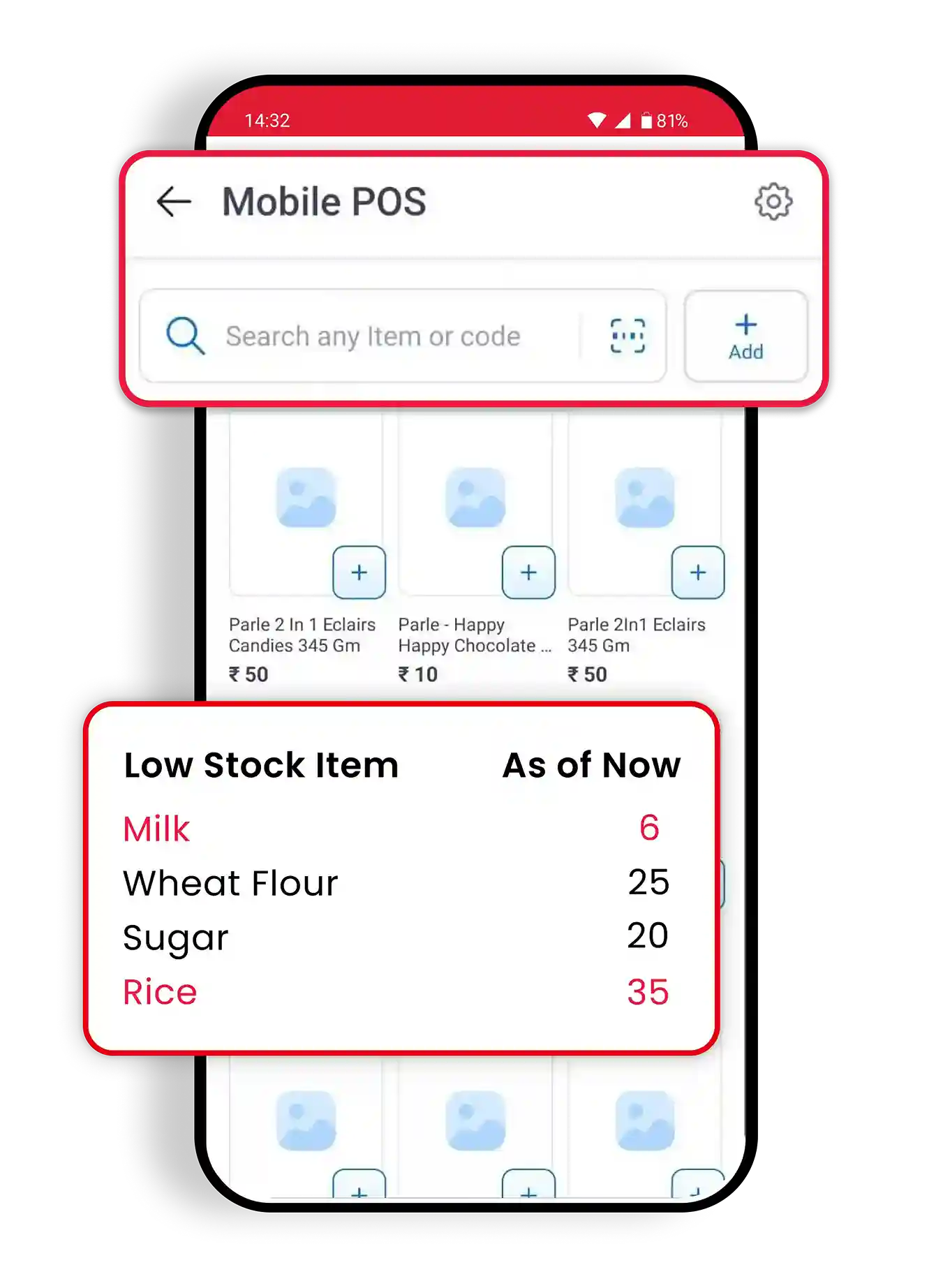
Barcode Inventory Management on Your Phone
Scan products using your phone camera, track inventory in real time, and receive low-stock alerts wherever you are. Check stock availability, monitor inventory movement, and stay connected to your business from anywhere.
Barcode Scanning
Instant Low-Stock Alerts
Cloud Sync
Secure Access
Fast & Offline
1cr+
Downloads
4.8⭐
App Rating
24/7
Access
We take pride
in our success
1.5cr+
Businesses Managing Accounts
50+
Inventory & Items Reports
10M+
Invoices Generated
70+
Industries served
4.8/5
Avg. user rating
100%
Secure Data Backup
❝ Highly rated by users ❞





Are you a Business Owner?
Take your business to the next level with Vyapar!
Try our Android App (FREE for lifetime)
Frequently Asked Questions (FAQs)
A barcode inventory management system is a combination of software and barcode scanning technology used to track inventory automatically. Each product is assigned a barcode that can be scanned during sales, purchases, stock transfers, and stock audits. This helps businesses maintain accurate inventory records, reduce manual bookkeeping work, and monitor stock levels in real time. Systems like Vyapar also connect barcode tracking with billing, reporting, and accounting.
Barcode scanning improves inventory management by reducing manual data entry and updating stock records automatically. When a barcode is scanned, product details such as item name, quantity, price, and stock status are recorded instantly. This helps businesses track inventory accurately, identify stock shortages faster, and complete billing and stock audits more efficiently.
Most businesses need barcode inventory software, barcode labels, and a scanning device. The scanner can be a USB barcode scanner, Bluetooth barcode scanner, or even a smartphone camera. Some businesses also use barcode label printers for printing product labels. Vyapar supports barcode scanning through mobile devices as well as external scanners, reducing the need for additional hardware.
Yes. Many barcode inventory systems allow businesses to use a smartphone camera as a barcode scanner. This eliminates the need to purchase dedicated scanning devices when starting out. Businesses can later add USB or Bluetooth barcode scanners if required. Vyapar supports barcode scanning through both mobile phones and external barcode scanners.
You can create barcodes in Vyapar directly from the product management section. After adding an item, the software can generate a barcode linked to that product’s details. The generated barcode can then be printed and attached to products, making billing and inventory tracking faster and more accurate.
Yes. Vyapar allows businesses to generate custom barcodes for products and services. Barcodes can be created using product information such as item name, SKU, or product code. These barcodes can then be printed as labels and used for inventory management, billing, and stock tracking.
Yes. Vyapar supports both USB and Bluetooth barcode scanners. Businesses can connect compatible scanners to their desktop or mobile device and use them for billing, stock entry, stock audits, and inventory tracking. This flexibility allows businesses to use existing hardware without changing their workflow.
Yes. Vyapar allows users to scan barcodes using their smartphone camera. This helps small businesses start barcode-based inventory management without purchasing a dedicated scanner. Mobile barcode scanning can be used for billing, inventory updates, stock verification, and product lookup.
Yes. When a barcode is scanned during a sale, purchase, or stock transfer, Vyapar automatically updates inventory records. This helps maintain accurate stock levels without manual entry and reduces the chances of inventory mismatches.
Yes. Vyapar includes barcode generation and printing features. Businesses can create barcode labels for products and print them using supported thermal printers or standard printers. These labels can be used for retail shelves, warehouses, packaging, and inventory tracking.
Yes. Vyapar supports batch-wise inventory management for products that require batch numbers and expiry tracking. Businesses can record batch details while adding inventory and track stock movement for individual batches. This is useful for industries such as pharmaceuticals, food distribution, cosmetics, and FMCG.
Yes. Vyapar allows businesses to monitor inventory across multiple warehouses, stores, or branches. Barcode-based stock transfers update inventory records automatically, making it easier to track stock availability and movement between locations.
Yes. Barcode scanning in Vyapar is connected with inventory and accounting workflows. When products are sold or purchased using barcode-based transactions, inventory records are updated, and the corresponding accounting entries are recorded automatically. This helps keep stock records and financial records synchronised.
Yes. Vyapar supports offline billing and inventory management on supported devices. Businesses can continue scanning barcodes, creating invoices, and updating inventory even when internet connectivity is unavailable. The data remains available locally and can sync when a connection is restored, depending on the setup being used.
Yes. Vyapar is available on Windows desktops and laptops, MacBooks, Android phones, and iPhones. With cloud sync, your inventory, purchases, invoices, and business records stay updated across devices, allowing you to manage your business operations seamlessly from anywhere.
Explore Vyapar Inventory Management Software
By Industry
By Feature
Related Software





