
Trusted by 1.5 cr Business Owners
Best IT Inventory Management Software
Track laptops, desktops, printers, networking devices, and IT accessories from one place with Vyapar’s Best IT asset inventory management software. Manage inventory, monitor stock levels, and keep your IT equipment organised using an easy-to-use solution built for Indian businesses.
Serial Number Tracking
Barcode Inventory
Auto Stock Updates
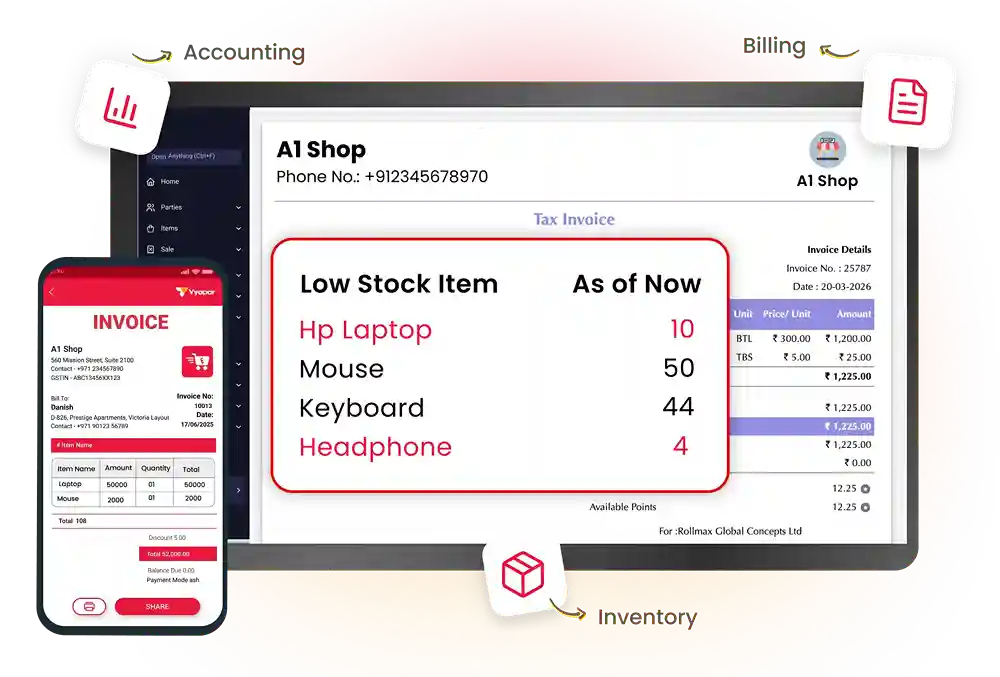
Trusted by 1.5cr+ Businesses Across India
Join the leading businesses already using Vyapar IT Inventory Management Software
What is IT Inventory Management Software?
IT inventory management software helps businesses track, organize, and manage all the IT equipment from one place. It keeps records of devices, software, stock levels, and asset movement, making it easier to maintain accurate inventory and avoid losses.
Why IT Hardware Dealers Need Inventory Management Software?
For IT hardware dealers, it simplifies inventory management by showing exactly what products are available, which items need restocking, and which products are selling the fastest. For offices and growing businesses, it provides a clear record of IT equipment owned by the company, helping reduce misplaced devices, duplicate purchases, and inventory errors.
With Vyapar IT inventory management software, businesses can also generate GST invoices, monitor inventory movement, manage suppliers, and access detailed business reports, all from a single platform.
How Does Vyapar Simplify IT Inventory Management
Record Serial Numbers
Barcode-Based Tracking
Purchases and Supplier Management
Manage Multiple Locations
Record Serial Numbers for Better IT Asset Tracking
Every IT product has a unique serial number that helps businesses identify and manage individual assets. Recording serial numbers makes it easier to distinguish between similar products, track ownership, verify warranties, and maintain accurate inventory records.
Vyapar inventory software lets you store serial numbers against each product, making asset tracking simple and organised. Whether you manage laptops, desktops, or networking devices, serial number tracking helps reduce duplicate records and improve inventory accuracy as your business grows.
- Track serial numbers
- Verify warranties easily
- Identify every asset
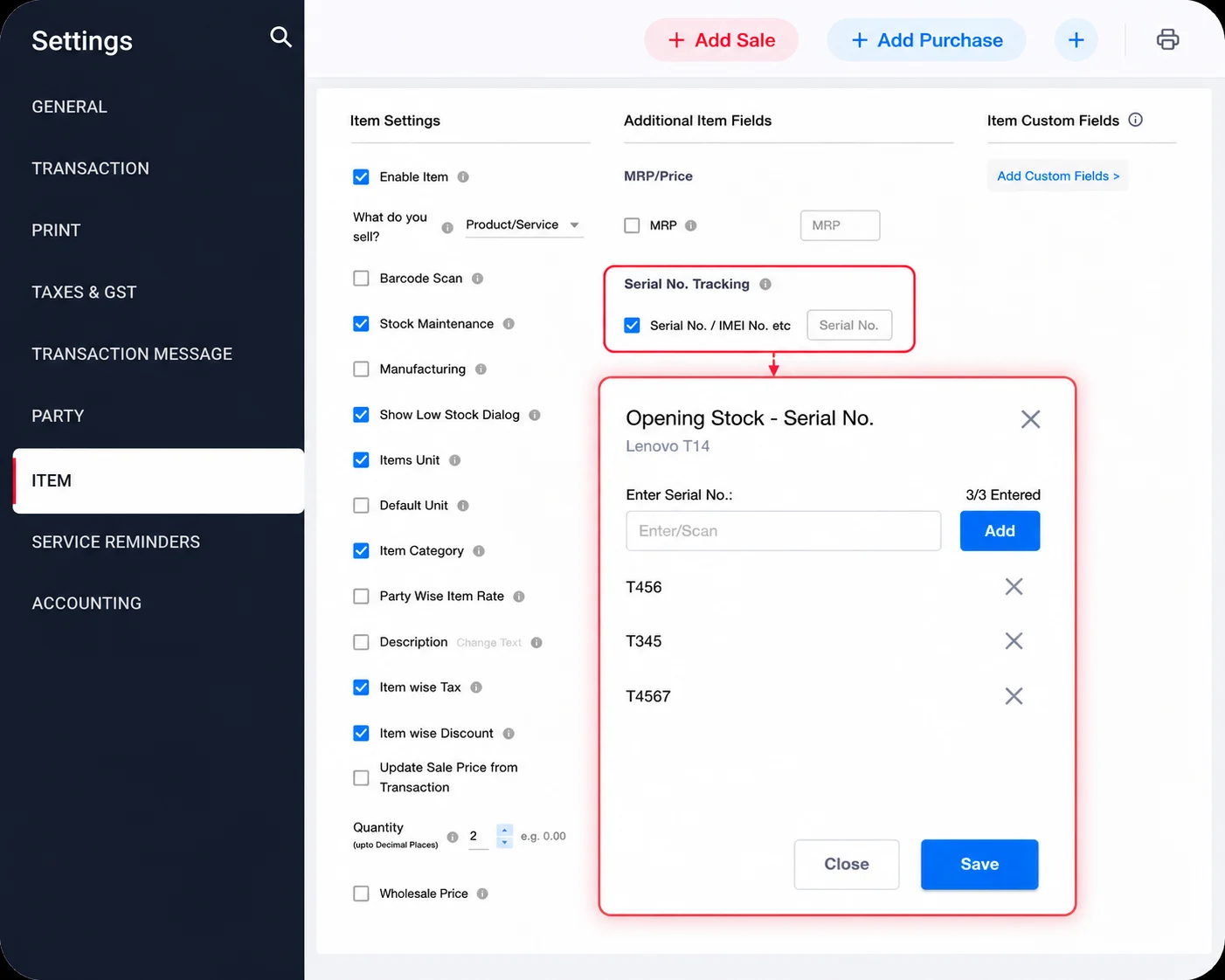
How it works:
Add the serial number while creating or updating an item in Vyapar app. The serial number remains linked to the product, making it easy to identify, track, and verify the asset whenever needed.
Key Benefits:
- Identify individual IT assets
- Simplify warranty verification
- Reduce duplicate records
- Improve inventory accuracy
Mini use case:
A laptop retailer quickly finds the exact laptop sold to a customer using its serial number, making warranty verification and after-sales support much faster.
Simplify Inventory with Barcode-Based Tracking
Searching for products manually can slow down billing and inventory management, especially when you handle hundreds of IT products. Barcode-based billing helps businesses identify products instantly while reducing manual work and improving operational efficiency.
Vyapar IT inventory software allows you to scan supported product barcodes using a compatible barcode scanner or your device camera. During billing or inventory management, the software instantly identifies the product and updates inventory automatically, helping businesses save time and reduce errors.
- Scan products instantly
- Speed up billing
- Reduce manual entry
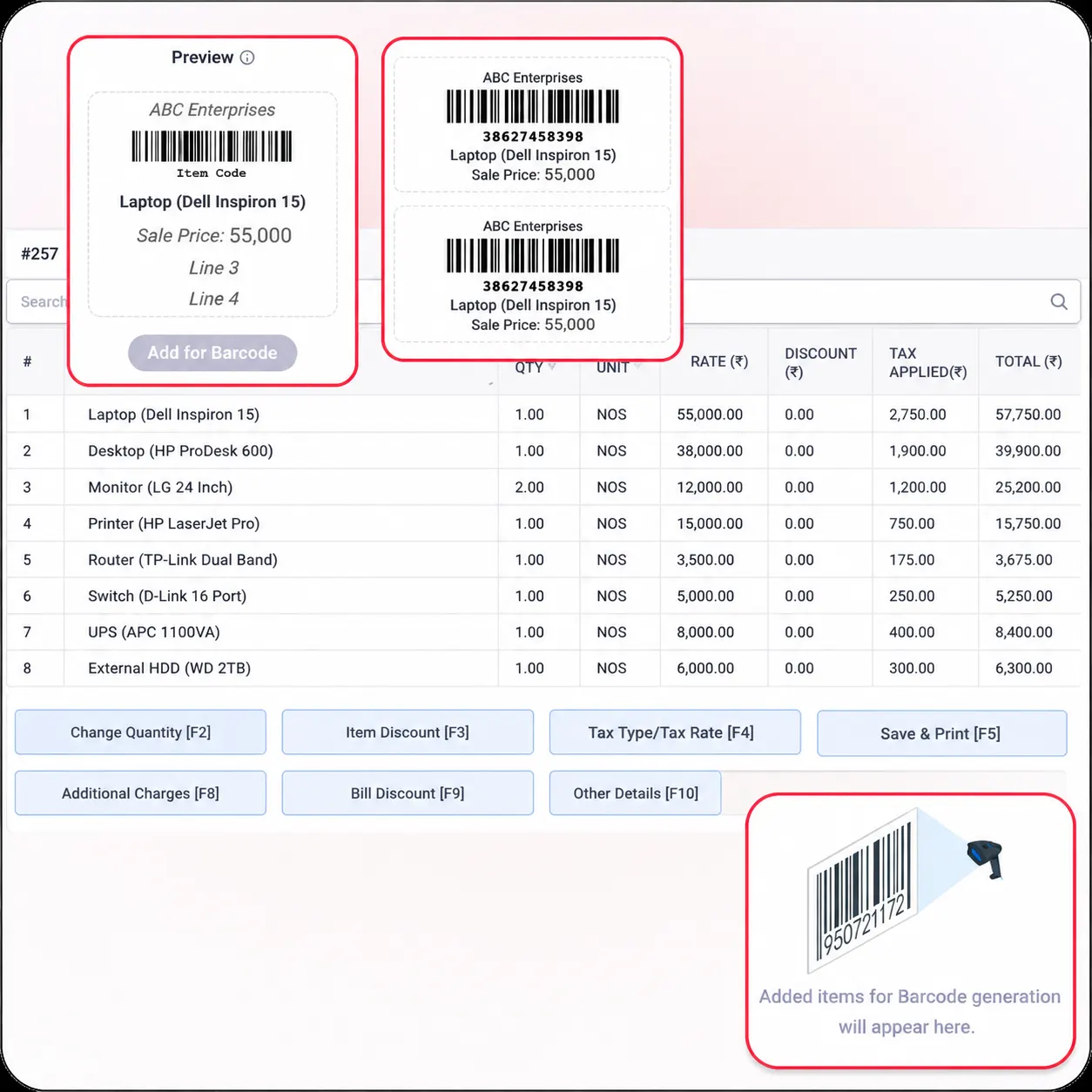
How it works:
Generate or use supported barcode labels for your products and attach them to the items. Scan the barcode during billing or stock management, and Vyapar automatically identifies the product while updating inventory.
Key Benefits:
- Faster product identification
- Improve billing efficiency
- Better inventory accuracy
- Reduce manual errors
Mini use case:
Computer accessories shops use barcode billing to scan keyboards and computer mice during billing instead of searching for each product manually, helping customers check out faster.
Record Purchases and Manage Supplier Transactions
Keeping purchase records organised is essential for maintaining accurate inventory and avoiding stock discrepancies. Every new shipment of laptops, printers, networking devices, or accessories should be recorded correctly to ensure inventory stays up to date.
Vyapar’s best IT inventory management software makes purchase management simple by allowing you to record purchase invoices, maintain supplier information, and automatically update inventory whenever new products arrive.
- Record purchase invoices
- Manage supplier details
- Update inventory automatically
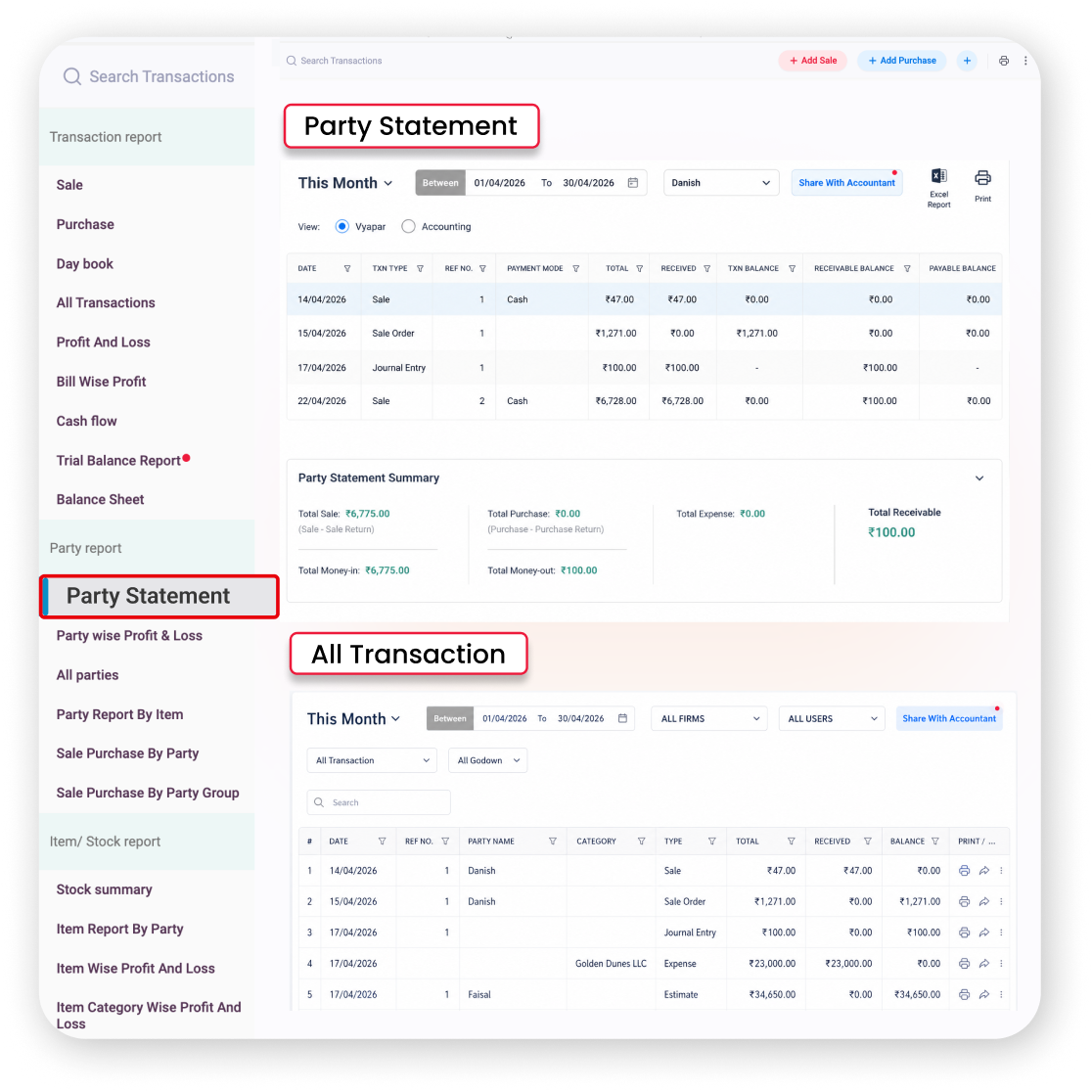
How it works:
Create a purchase entry whenever new IT equipment is received. Vyapar app updates stock quantities, stores supplier details, and maintains a complete purchase history for future reference.
Key Benefits:
- Update stock after every purchase
- Maintain supplier information
- Record purchase history
- Track purchase expenses
Mini use case:
An IT hardware distributor receives a shipment of laptops, routers, and SSDs from multiple suppliers. By recording the purchase, inventory is updated instantly, and supplier details are saved automatically.
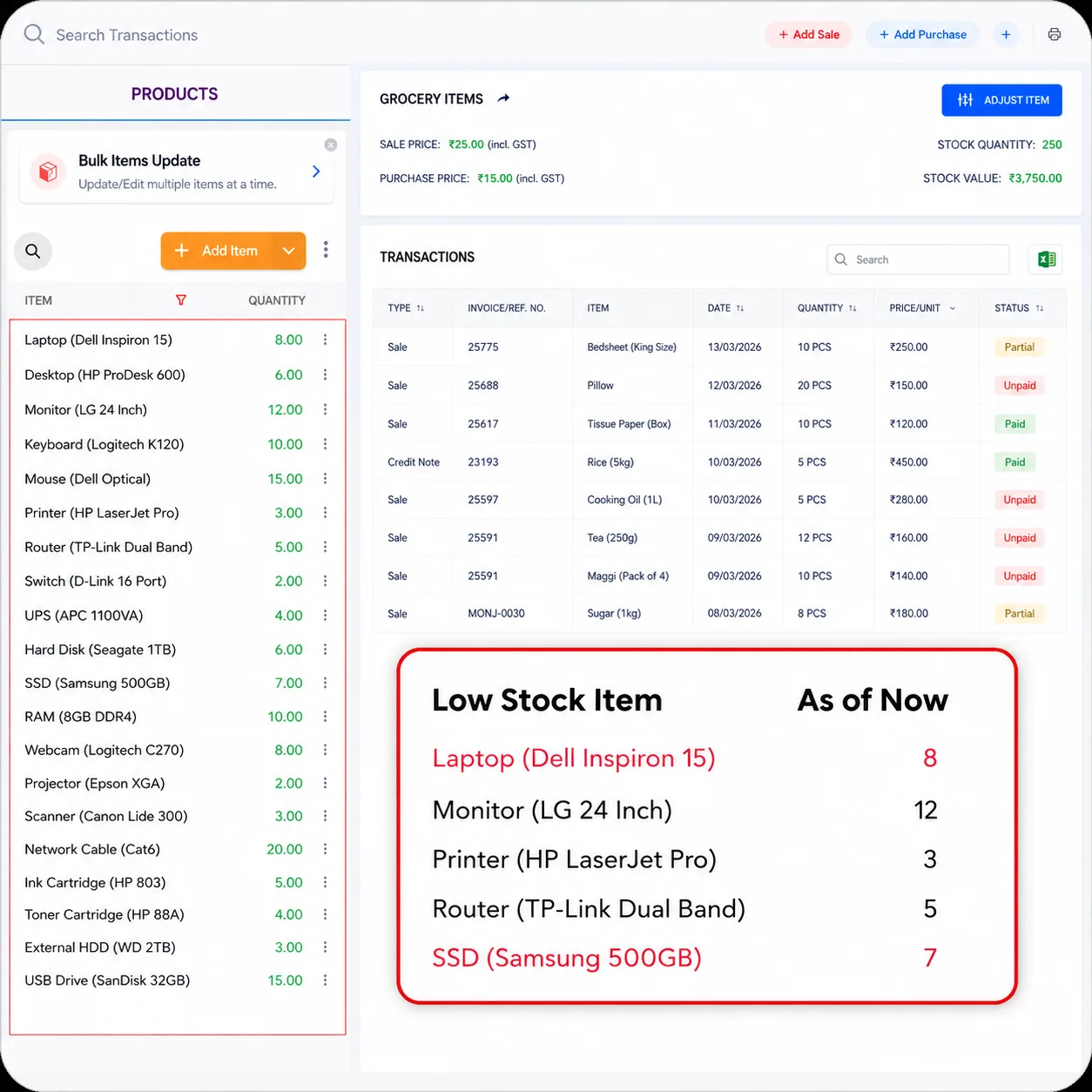
Never Miss a Restocking Opportunity with Low Stock Alerts
Running out of popular IT products can lead to missed sales and unhappy customers. Monitoring inventory manually is time-consuming, especially when your business manages a wide range of products across different categories.
Vyapar’s best IT inventory management software continuously monitors stock levels and notifies you whenever inventory reaches the minimum quantity you’ve set. This allows you to reorder products on time, avoid stock shortages, and keep your business running without interruptions.
- Receive low-stock alerts
- Restock on time
- Avoid lost sales
How it works:
Set a minimum stock quantity for each product. When inventory falls below the specified level, Vyapar alerts you so you can reorder products before they run out.
Key Benefits:
- Prevent stock shortages
- Maintain product availability
- Improve inventory planning
- Avoid missed sales
Mini use case:
A computer parts dealer receives a low-stock alert for SSDs and laptop chargers. They reorder inventory before stock runs out, ensuring customer demand is met without delays.
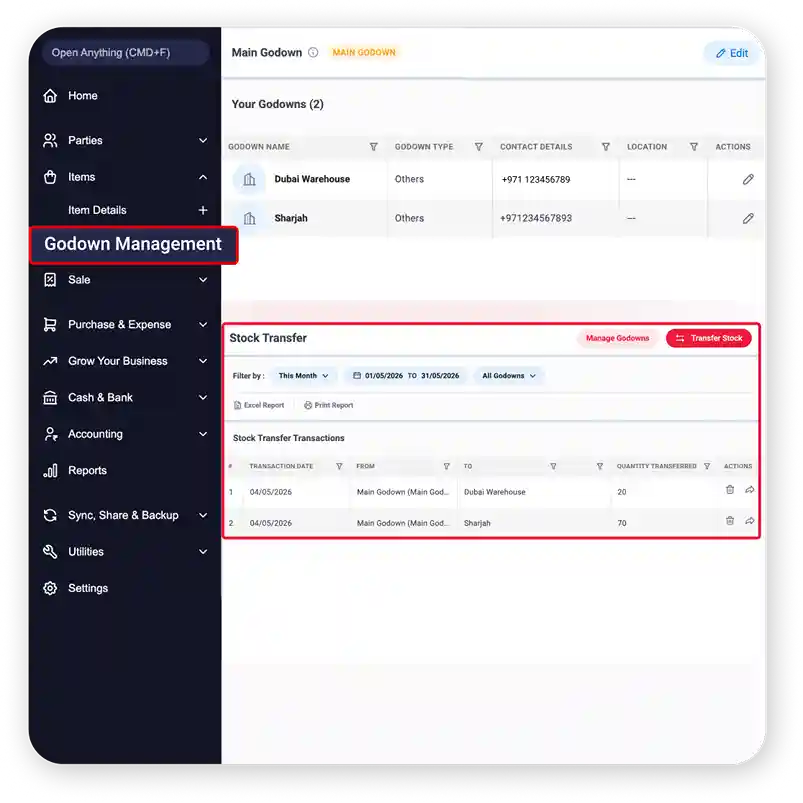
Organise Inventory Across Multiple Business Locations
Managing inventory across multiple branches or warehouses can become difficult when stock records are maintained separately. Without centralised visibility, businesses often face stock mismatches, delayed transfers, and inefficient inventory planning.
Vyapar IT asset inventory software helps you organise inventory across different business locations from a single platform. You can monitor stock availability at every branch, maintain accurate records, and transfer inventory whenever required for better business control.
- Manage multiple locations
- Monitor stock centrally
- Simplify stock transfers
How it works:
Create separate business locations in Vyapar and manage inventory for each branch individually. Monitor stock levels, review branch-wise inventory, and transfer products between locations whenever required.
Key Benefits:
- Better inventory visibility
- Organised stock records
- Easier branch management
- Faster stock reconciliation
Mini use case:
A computer retailer with stores in Bengaluru and Mysuru checks stock availability across both branches and transfers networking devices from one location to another to fulfil a customer order quickly.
Common Challenges in IT Inventory Management
How Does Vyapar IT Inventory Management Work?
Manage your IT inventory in four simple steps. From adding inventory to tracking stock and generating reports, Vyapar helps you keep everything organised from one place.
01

Purchase & Add Assets
Whenever you buy new laptops, desktops, printers, or networking equipment, add them to Vyapar app with product details and purchase information.
›
02
Organise & Use Assets
Keep all your IT equipment organised in categories, monitor available stock, and use it for your daily business operations.
›
03

Maintain Asset Value
As your business grows, keep financial records updated by recording depreciation or appreciation entries whenever required.
›
04

Review & Plan Ahead
Use inventory and financial reports to understand asset value, identify replacement needs, and make better purchasing decisions
Complete Business Management
Everything You Need for IT Asset Management
Create GST Invoices
Inventory Reports
Mobile App Support
Depreciation & Appreciation
Offline Access
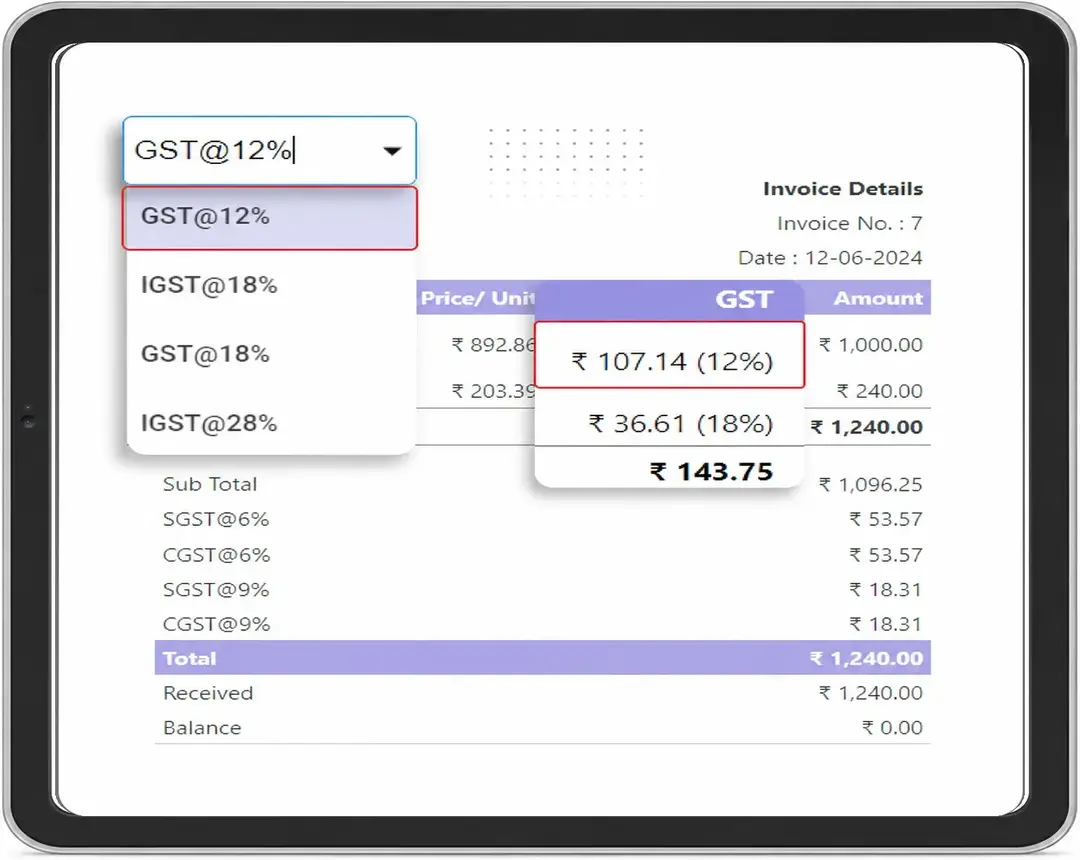
Create GST Invoices for IT Products in Seconds
Managing inventory becomes much easier when billing and stock updates happen together. Vyapar GST billing software allows computer shops, IT hardware dealers, and service businesses to generate professional GST invoices while automatically updating inventory after every sale. Invoices can include:
- Product details
- GST information
- Customer details
- Item quantities
- Pricing
- Discounts
- Taxes
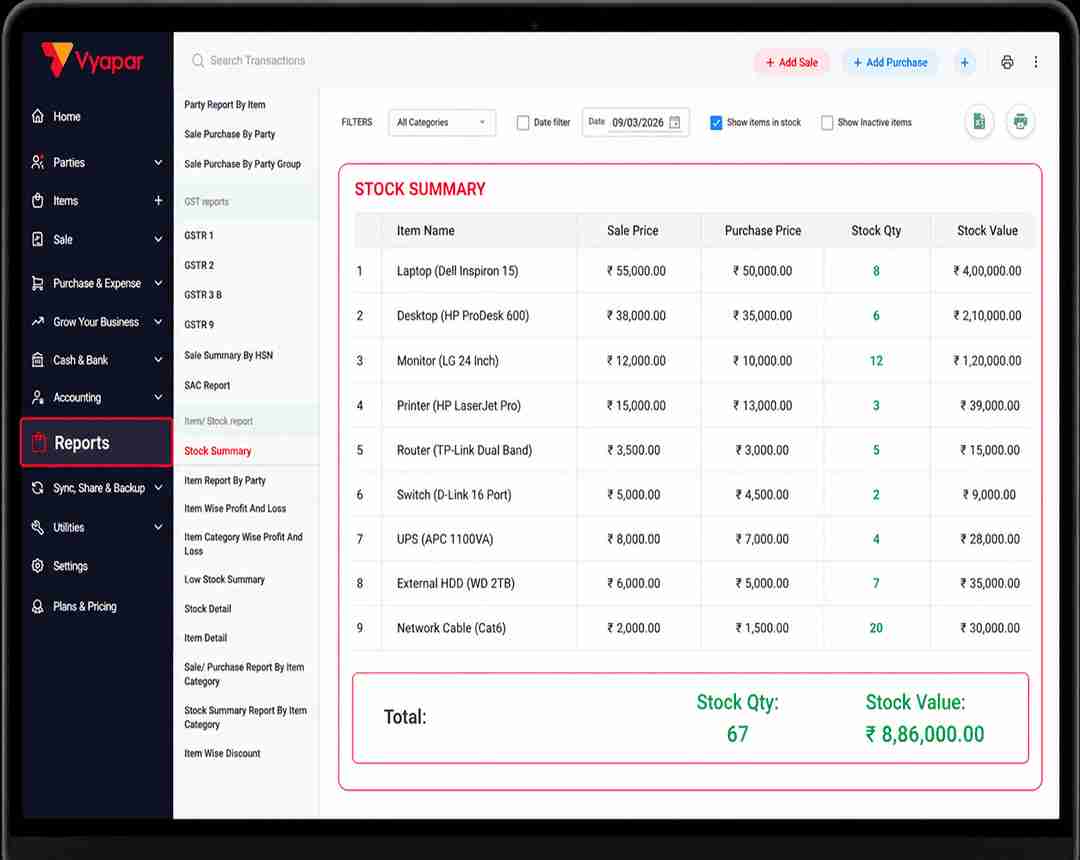
Understand Your Business with Inventory Reports
Good decisions require accurate data. Vyapar app generates inventory and business reports that help you understand product performance, purchasing patterns, and overall inventory status. Instead of manually analysing spreadsheets, businesses can quickly review reports to understand:
- Available stock
- Inventory value
- Fast-selling products
- Slow-moving items
- Purchase history
- Sales trends
- Business profitability
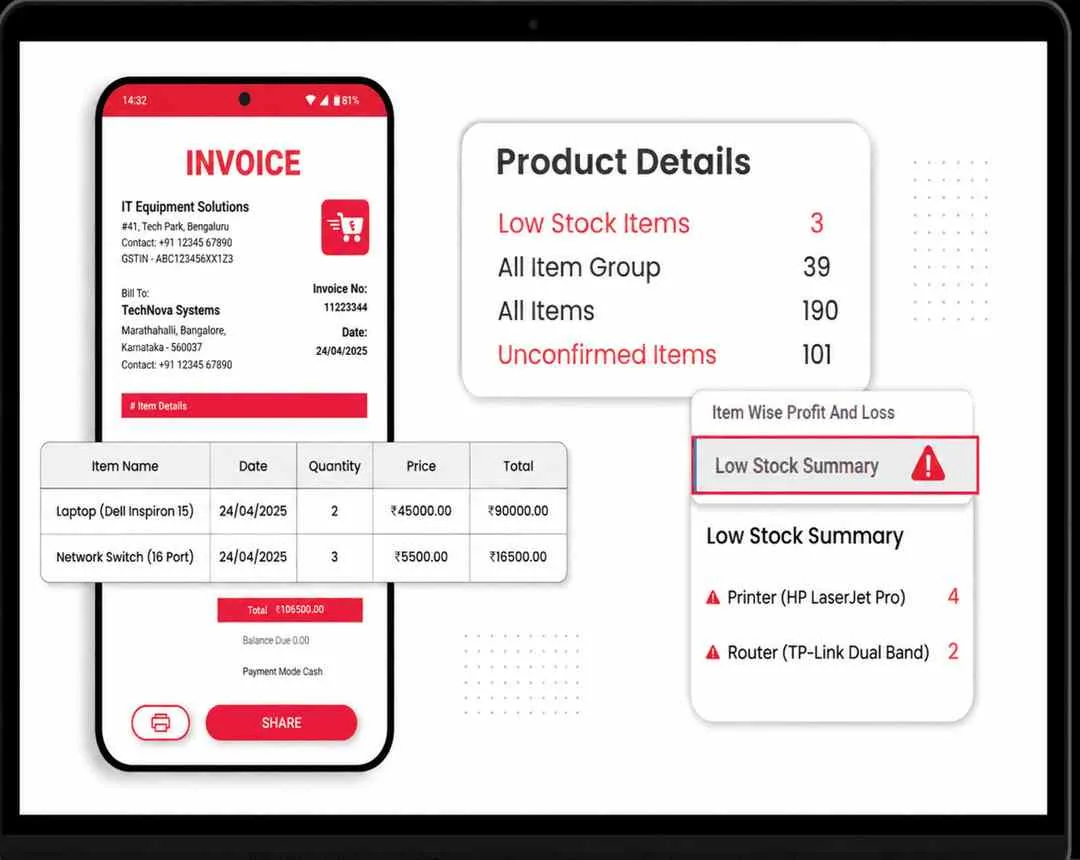
Manage Your IT Inventory Anytime with the Vyapar Mobile App
Business doesn’t stop when you’re away from your desk. With the Vyapar mobile app, you can check inventory, create invoices, record purchases, monitor stock levels, and view important business reports directly from your smartphone. Use the mobile app to:
- Check inventory availability
- Create GST invoices
- Record purchases
- Monitor low-stock items
- View sales reports
- Track business performance
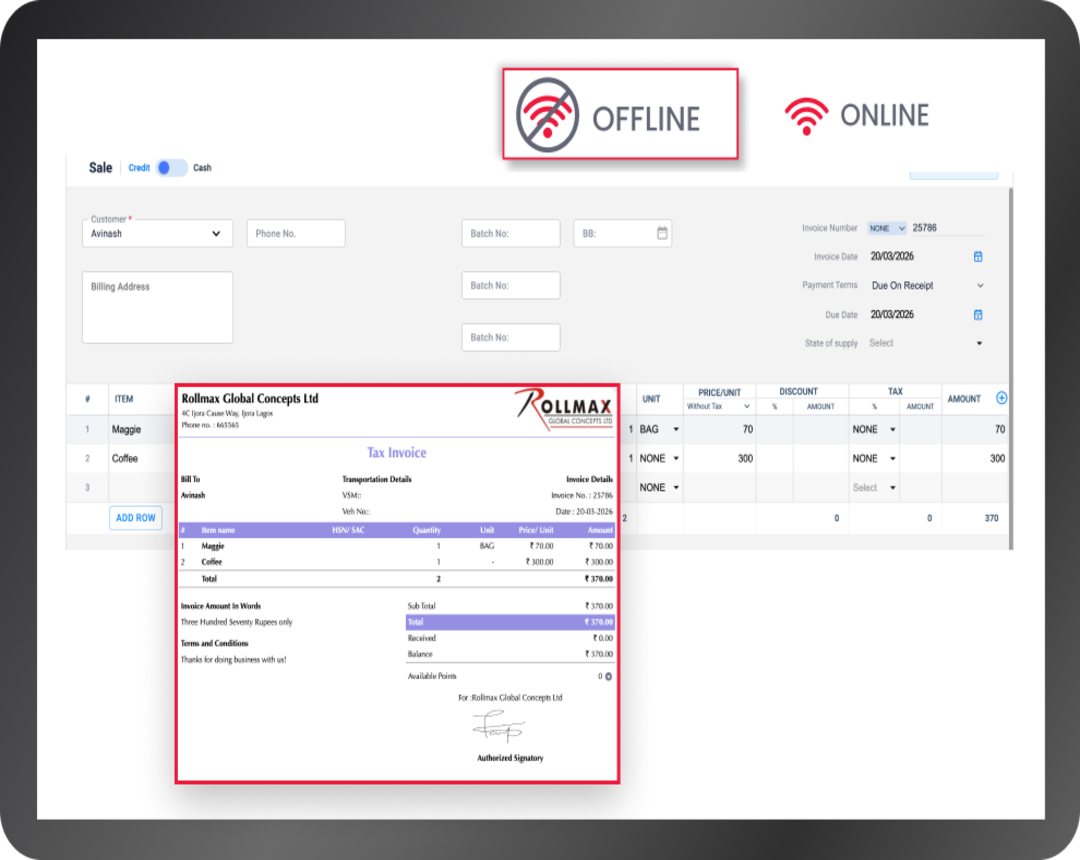
Continue Working Even Without Internet
Internet disruptions shouldn’t stop your business. Vyapar works offline, allowing businesses to continue creating invoices, managing inventory, and recording transactions without relying on a constant internet connection. With Vyapar app offline access, you can:
- Create invoices offline.
- Record purchases without internet.
- Manage inventory uninterrupted.
- Continue billing during network outages.
- Sync your data when connectivity is restored
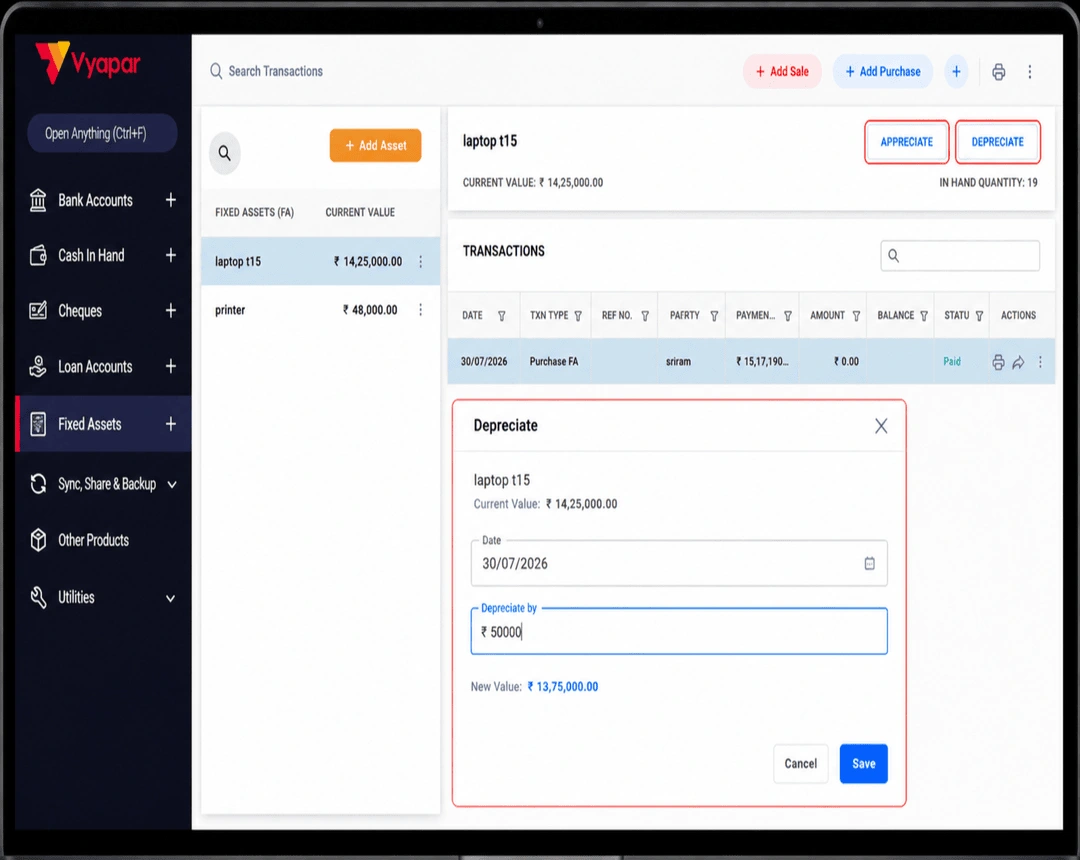
Track Asset Value with Depreciation & Appreciation Entries
Understanding the value of your business assets is just as important as tracking inventory. Vyapar online accounting software helps businesses record depreciation and appreciation entries, allowing you to maintain accurate financial records while monitoring the value of IT equipment and other business assets. You can:
- Record depreciation entries for business assets.
- Maintain appreciation entries whenever applicable.
- Monitor the current value of assets over time.
- Keep accounting records organised alongside inventory.
- Generate financial reports with updated asset values.
Built for IT Asset Management
What IT Assets Can You Track with Vyapar Inventory Software?

Track Computer Systems
Maintain an organised inventory of all your computing devices to ensure accurate stock records and easy availability checks.

Manage Networking Equipment
Networking devices are essential for businesses and often involve multiple models and configurations. Vyapar app helps you organise them efficiently.

Keep Printing & Office Devices Organised
Track office equipment like laser printers, inkjet printers, barcode printers, and receipt printers used for daily operations and customer service.

Track Computer Components & Spare Parts
Managing spare parts like RAM modules, SSDs, and hard disk drives efficiently helps IT hardware dealers and repair centres reduce delays during repairs and maintain adequate inventory.

Organise Computer Accessories
Small accessories often move quickly and are easy to lose track of without proper inventory management. With Vyapar app, you can track keyboards, mouse devices, webcams and others

Manage Security & Surveillance Equipment
Businesses dealing with surveillance systems like CCTV cameras, DVR systems, NVR systems, and biometric attendance devices can maintain organised inventory records for security products.
View MoreView Less
What Other Features Does Vyapar
IT Inventory Software Offer?
Inventory management is just one part of running a business. Vyapar IT Inventory Management System also helps you manage billing, purchases, team access, and other important tasks, so you don’t need multiple software to run your business.

Expense Tracking
Record your day-to-day business expenses in one place and keep a clear record of where your money is being spent.

GST Reports
Generate GST-ready reports whenever you need them, making tax filing and compliance much simpler for your business.

Automated Payment Reminders
Send timely payment reminders to customers with pending dues and improve collections without following up manually every time.

Multi-User Access
Generate GST-ready reports whenever you need them, making tax filing and compliance much simpler for your business.

Inventory Audit Trail
Keep track of every change made to your business records, helping you maintain transparency and monitor important activities.

WhatsApp Invoice Sharing
Share invoices directly with your customers on WhatsApp in just a few clicks for faster communication and quicker payments.
Start Managing Your IT Inventory Today!
Hear What Business Owners Say About Vyapar IT Inventory Software
Real experiences from businesses using Vyapar every day.
“One app for billing, stock update and GST compliance
Vyapar gives me peace of mind, my invoices and GST returns are accurate, and app keeps everything clean and simple for my shop.”
– Source: Capterra
“Easy Inventory software for Indian Businessmen.
The app essentially facilitates easy use of mobile phone for the purpose of billing and inventory management.”
– Source: Capterra
“Best Billing, Accounting & Inventory Management Software. Best billing app I have ever seen in the play store. I liked their invoice formats. I was shocked that there are 14 invoice formats. No one will provide these many formats for free. Faster billing and accounting and UI are also too good.”
– Source: Capterra
“My personal view
Being a businessman, with a busy schedule and I often don’t get time to maintain balance and inventory for my company. Vyaparapp Helps in easy handling my company transactions and details”
– Source: Capterra
“Vyapar’s inventory tracking has completely transformed our stock management. We used to spend 4 hours daily on manual counting. Now everything updates in real-time and our stock errors dropped by 43%.”
– Source: Software Suggest
“Best accounting and inventory management software – Vyapar helped save my time from doing manual entry. I just need to create my sales and record my purchases; everything else is taken care of by Vyapar. It’s the best app, I must say. It easy features helps every business to understand accounting term.”
– Source: Software Suggest
We take pride
in our success
1.5cr+
Businesses Managing Inventory
50+
Inventory and Business Reports
10M+
Invoices Generated
70+
Industries served
4.8/5
Avg. user rating
100%
Secure Data Backup
❝ Highly rated by users ❞





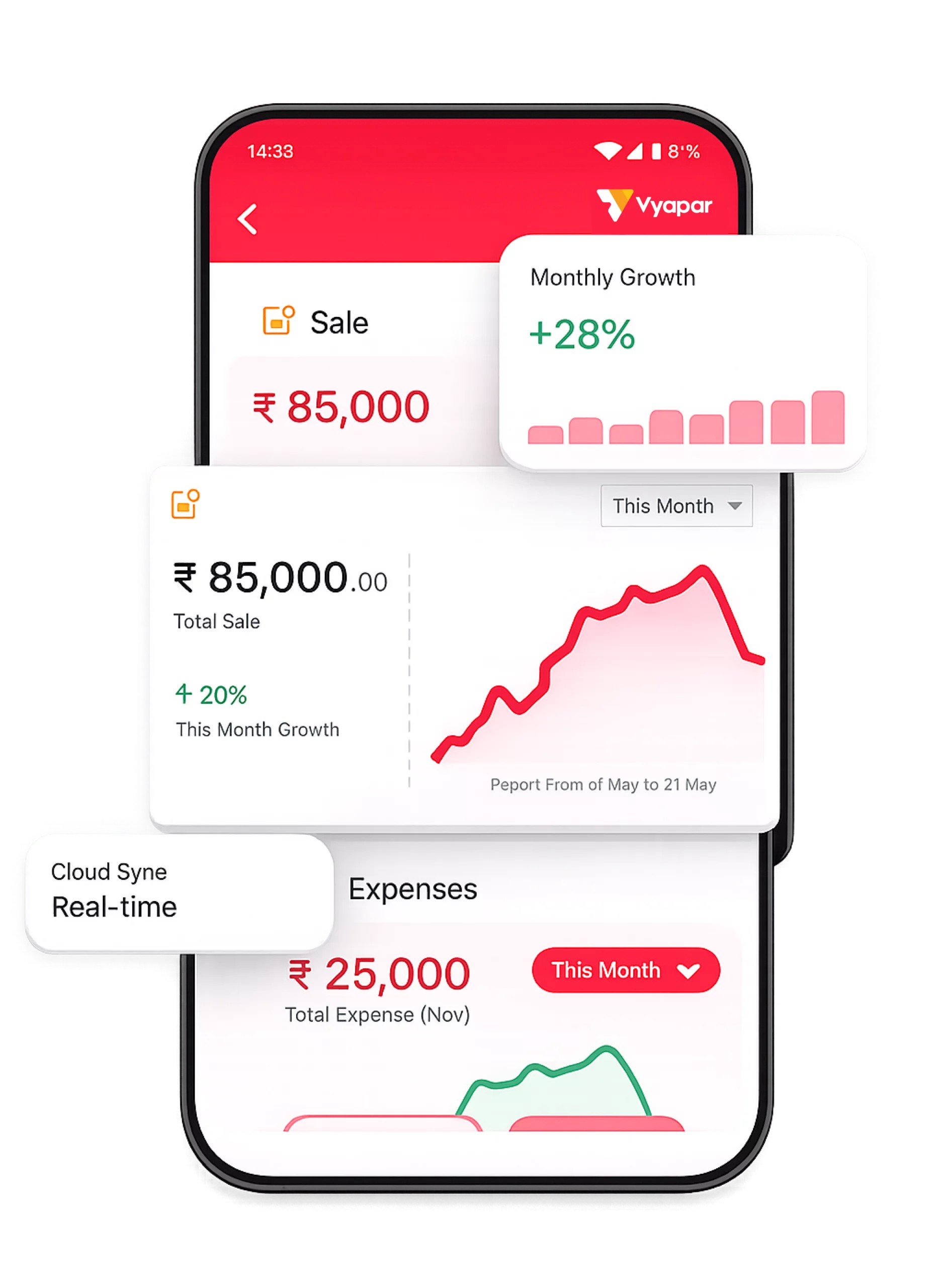
Manage Your IT Asset From Anywhere
Stay connected to your business wherever you are with the Vyapar mobile app. Track IT inventory, create GST invoices, record purchases, monitor stock levels, and view business reports right from your phone.
GST Billing
Purchase Management
Payment Tracking
Fast & Offline
1.5cr+
Downloads
4.8⭐
App Rating
24/7
Access
FAQs on IT Inventory Management Software
Find answers to the most common questions about IT inventory management software and learn how Vyapar helps businesses manage IT equipment, inventory, billing, and accounting from one platform.
IT inventory management software helps businesses keep track of their IT equipment, such as laptops, desktops, printers, networking devices, and computer accessories. It allows you to create GST and non-GST invoices, record purchases, monitor inventory, track asset values, and manage business records from a single system instead of using spreadsheets or manual registers.
Any business that buys, sells, or uses IT equipment can benefit from IT asset inventory management software. It is commonly used by computer shops, IT hardware dealers, repair centres, schools, hospitals, startups, offices, and other small businesses to keep inventory organised and reduce manual record-keeping.
When choosing IT inventory management software, look for features such as inventory tracking, barcode support, GST billing, purchase management, stock alerts, business reports, depreciation tracking, appreciation entries, and multi-location inventory management. These features help businesses manage IT assets more efficiently.
Yes. Modern IT inventory management software is designed for businesses of all sizes. Small businesses can use it to manage laptops, desktops, printers, networking equipment, and other IT assets without maintaining complex spreadsheets or expensive enterprise systems.
Vyapar app helps businesses organise IT assets by maintaining inventory records for computers, laptops, printers, networking devices, spare parts, and accessories. It combines inventory management, accounting, and GST billing in one easy-to-use software.
With Vyapar app, you can track laptops, desktops, printers, scanners, routers, switches, CCTV equipment, UPS systems, computer accessories, spare parts, storage devices, and other office IT equipment.
Yes. Vyapar app allows businesses to record depreciation and appreciation entries, helping maintain accurate accounting records and updated asset values alongside inventory management.
Yes. Vyapar app enables businesses to create GST-compliant invoices for IT products. Inventory is automatically updated after each sale, reducing manual work and improving inventory accuracy.
Yes. Vyapar app supports barcode inventory management, allowing businesses to identify products quickly during billing and inventory management using compatible barcode scanners.
Yes. Vyapar app allows businesses to manage inventory across multiple branches or warehouses, making it easier to monitor stock availability and maintain organised inventory records.
Yes. Vyapar app is designed for computer shops, IT hardware dealers, wholesalers, and repair centres. It helps manage inventory, purchases, GST billing, accounting, and business reports from one platform.
Yes. Vyapar app works offline, allowing businesses to continue managing inventory, billing, and accounting without an internet connection.
Vyapar app provides inventory reports, stock summaries, purchase reports, sales reports, profit and loss reports, and other business reports to help businesses monitor performance and make informed decisions.
Vyapar app is built for Indian MSMEs that need an easy-to-use IT asset inventory management software. It combines inventory management, GST billing, accounting, barcode support, asset depreciation and appreciation, and business reporting in one affordable solution for computer shops, IT hardware dealers, and small businesses.
Still have questions?
Start Managing Your Business Smarter Today
Join 1.5 Crore+ businesses who trust Vyapar for their Manufacturing Inventory Software. Get started in minutes, not days.
🛡 100% Secure





